More Work

Mood Muse

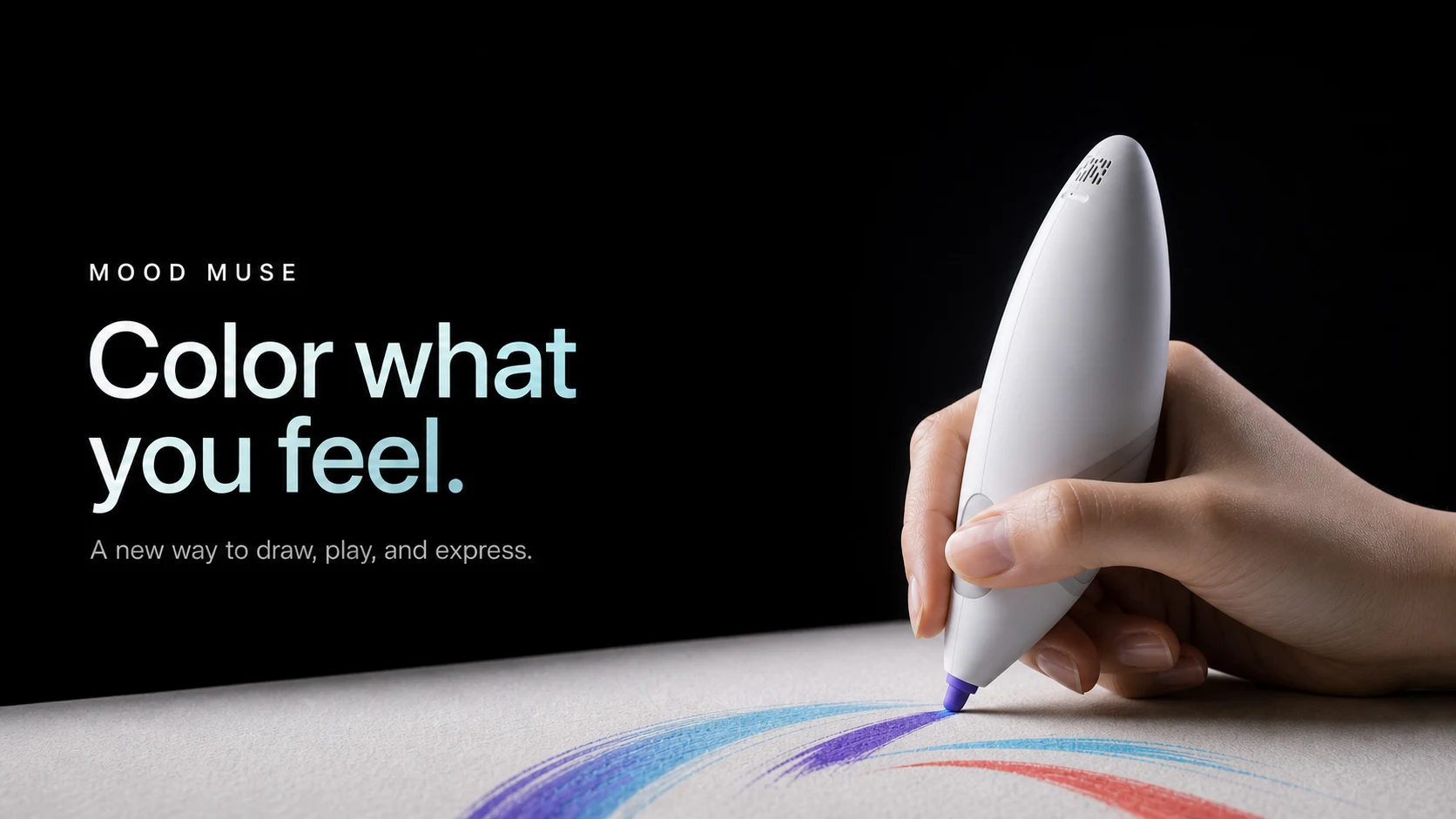
An emotion-sensing paintbrush that lets autistic children say how they feel without saying anything.

Mood Muse project visual

Intro

A paintbrush that reads the hand holding it

Mood Muse is a smart paintbrush for children on the autism spectrum. Sensors in the grip read arousal while the child paints, the brush answers with ink color and scent, and a companion app turns the session into something a parent and therapist can read together.

Many autistic children feel a lot and can name very little of it in the moment. Art therapy already gives them a wordless channel. Mood Muse puts the sensing inside the tool they are already holding, so expression and detection happen in the same stroke.

I led the team, owned the industrial design and the working prototype, and was the only designer on the Mood Connect app.

Role

Industrial Design Lead · Sole UX Designer

Timeline

2024

Team

Team Lead · Collaborative Industrial Design

Scope

Brush · Sensing · Prototype · Mood Connect App

Highlights

One object for the child, one record for the adults around them.

Reads arousal through the gripShifts ink color with the moodRewards a positive turn with scentTurns a painting into a mood recordConnects parent and therapistNeeds no button mid-session

A child who can’t say the feeling can still paint it. The brush listens to the hand.

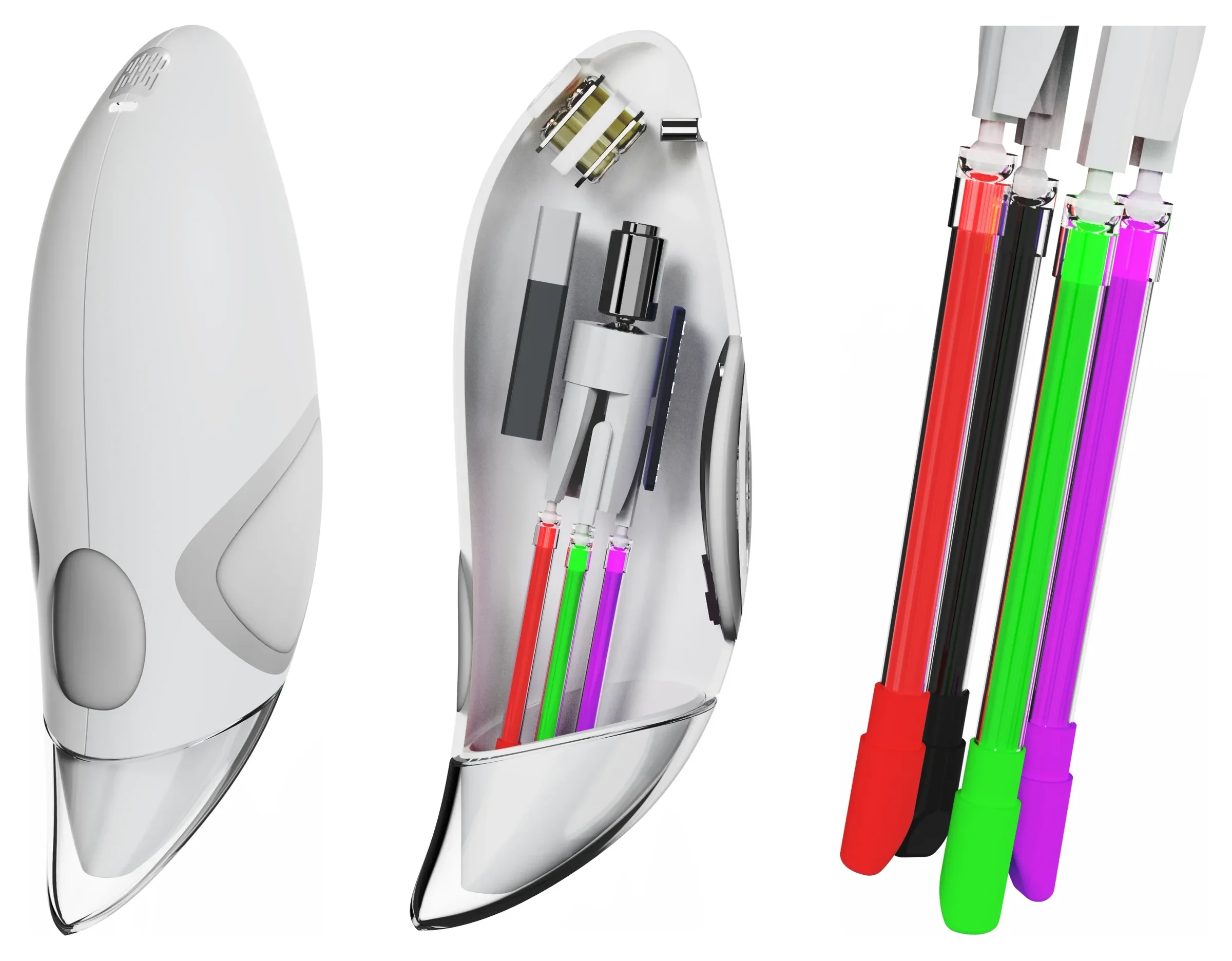
Outside, inside, and the four inks the motor switches between

Side view of the white brush, a translucent view of its motor, board, battery and ink tubes, and the four ink cartridges

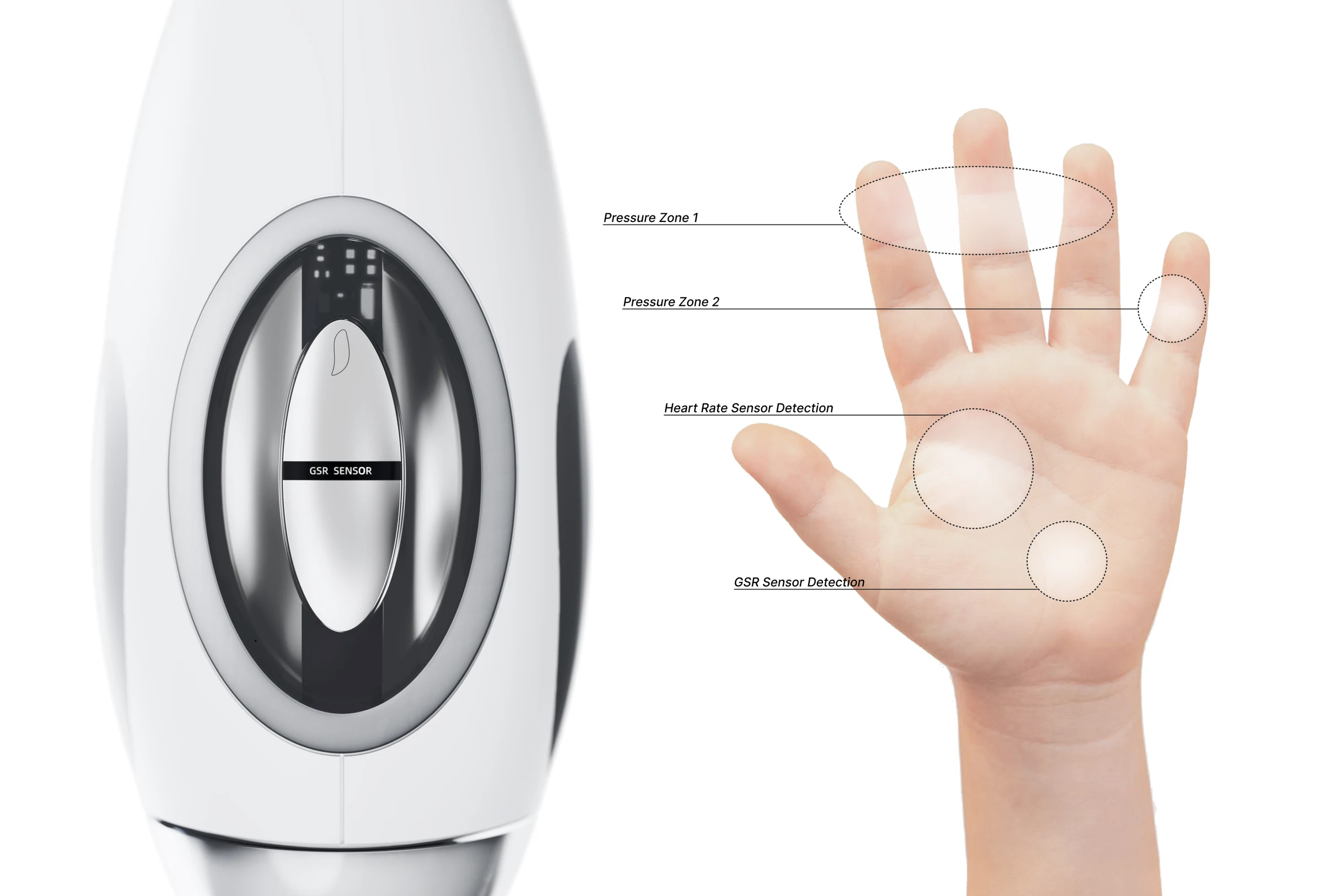
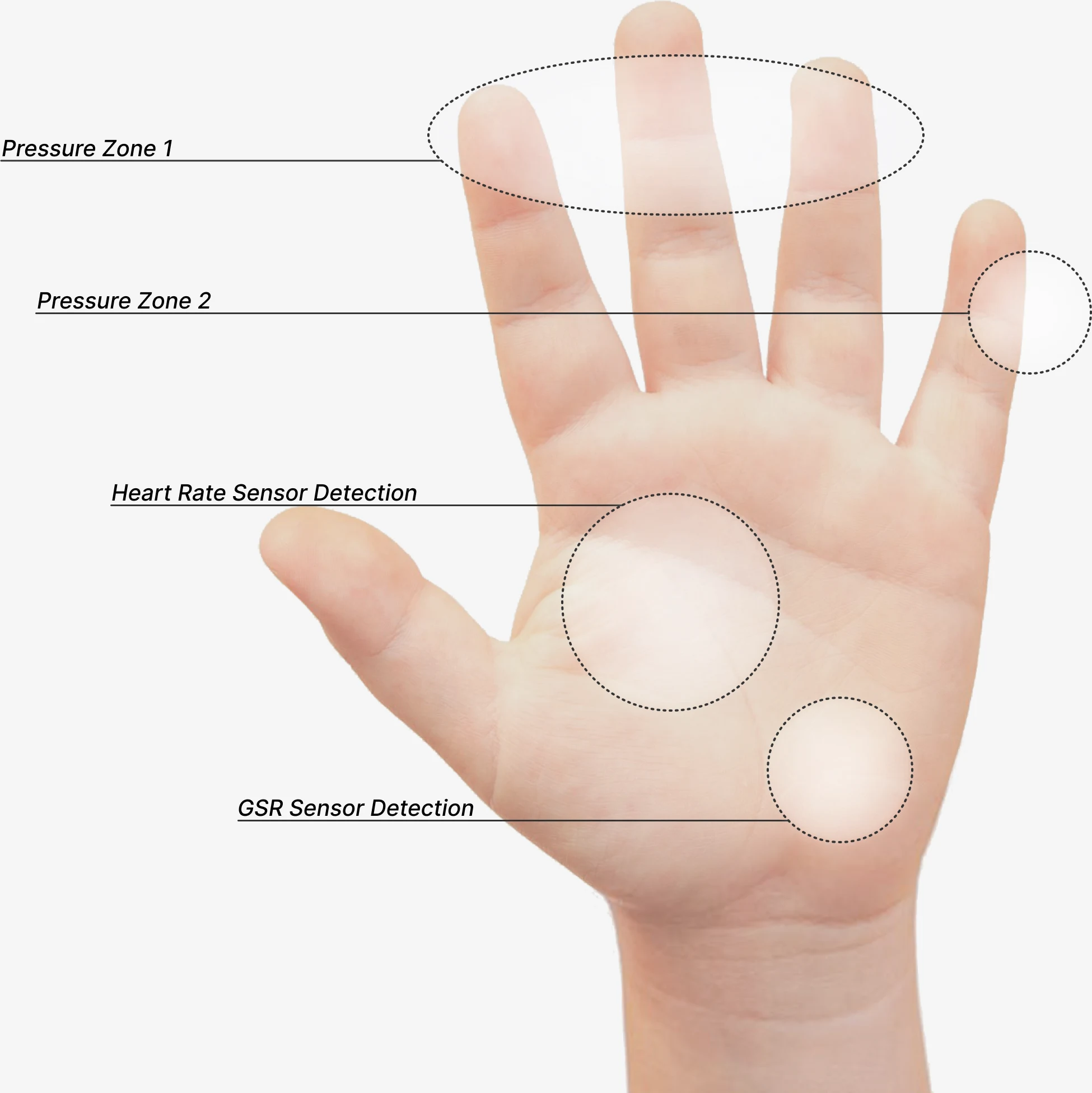
Sensors where the hand already presses: the two pressure zones double as the contact points

The brush's GSR sensing window beside an open child's palm, marked with Pressure Zone 1 across the fingers, Pressure Zone 2 on the little finger, and the heart rate and GSR sensor detection areas on the pad below

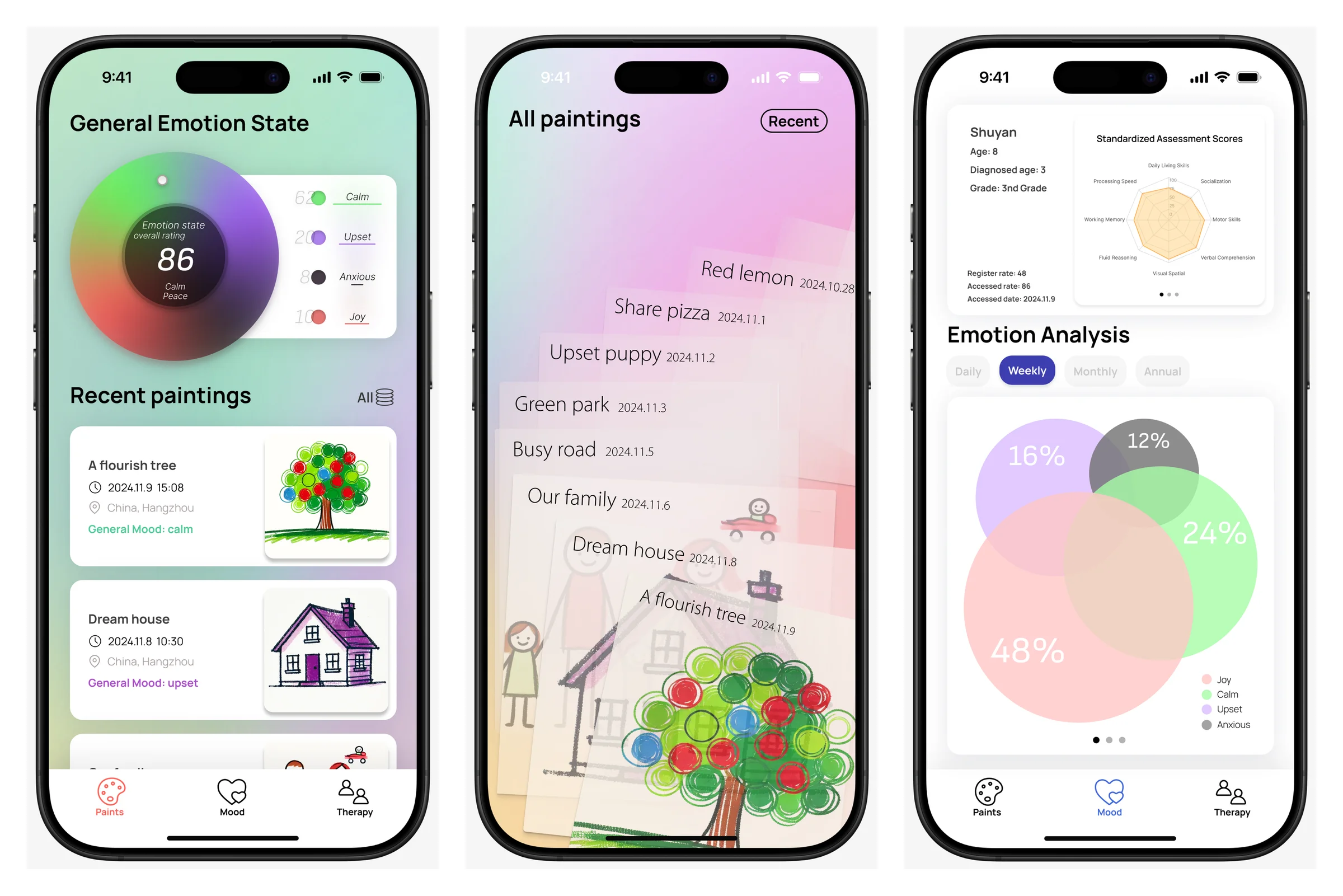
Mood Connect: where a session becomes something a parent and therapist can read

Three Mood Connect screens: an emotion-state ring, the memory slider of past paintings, and an emotion analysis breakdown

The Problem

The feeling arrives before the words do

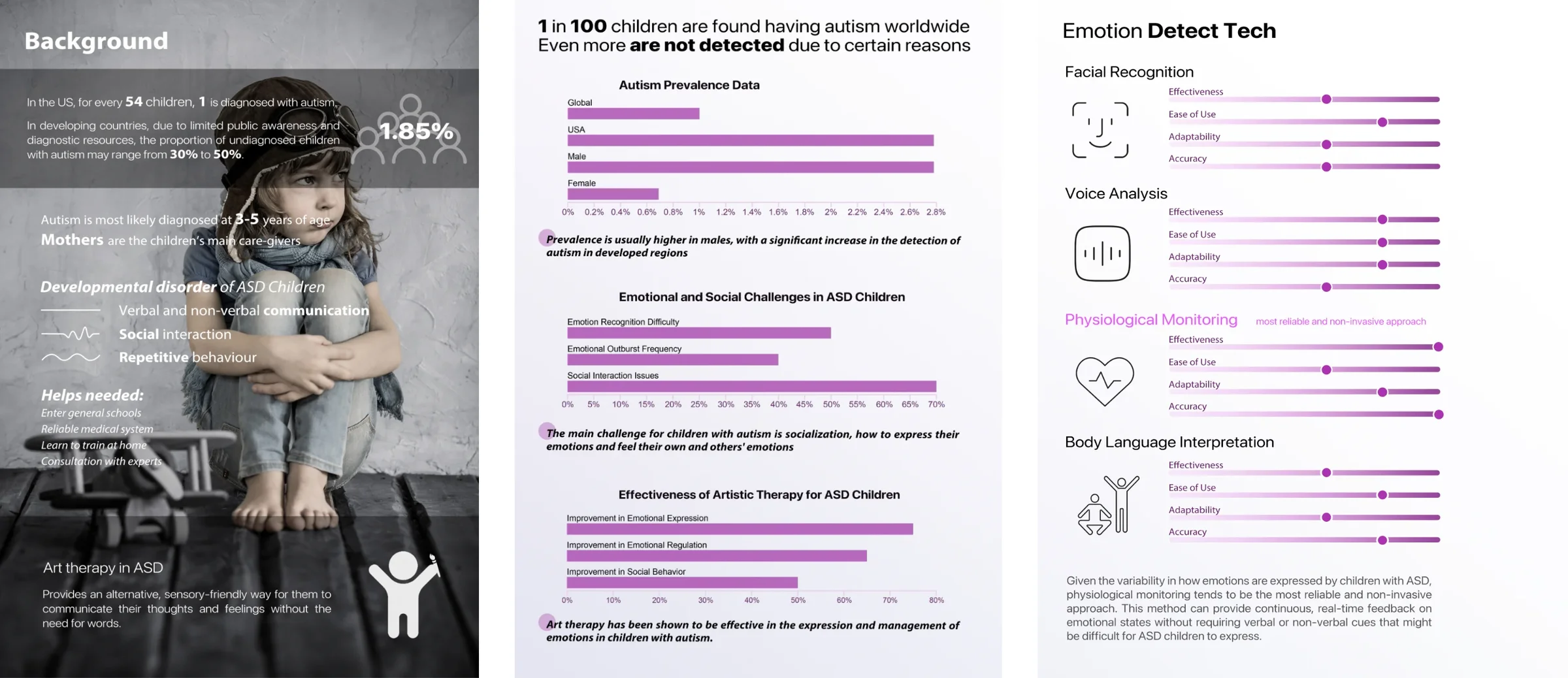
In the US, one child in 54 is diagnosed with autism, most often between three and five, and mothers carry most of the care. The core difficulties are communication, social interaction, and adapting to change. Families told us what they need: mainstream schools, a reliable medical system, ways to train at home, access to experts.

Research board: autism prevalence and care statistics over a black-and-white child photo, three purple bar charts on prevalence, emotional challenges, and art-therapy effectiveness, and a comparison of four emotion-detection technologies

The emotional part is the hardest to reach. In the numbers we gathered, roughly half of autistic children struggle to recognize emotions and 70% struggle with social interaction. Art therapy is one of the few interventions that works on exactly this: around 75% show better emotional expression, 65% better regulation.

The gap wasn't a missing therapy. It was that nobody could tell, while the child was painting, what the painting was about.

Research

Who holds the brush, and who needs to know

We compared six therapies (ABA, speech and language, occupational, social skills, CBT, art) and rated four ways to detect emotion: facial recognition, voice analysis, body language, and physiological monitoring. Because autistic children express emotion so variably, physiological signals came out as the most reliable and least intrusive: continuous, real time, and independent of cues the child may not give.

Three People in the Room

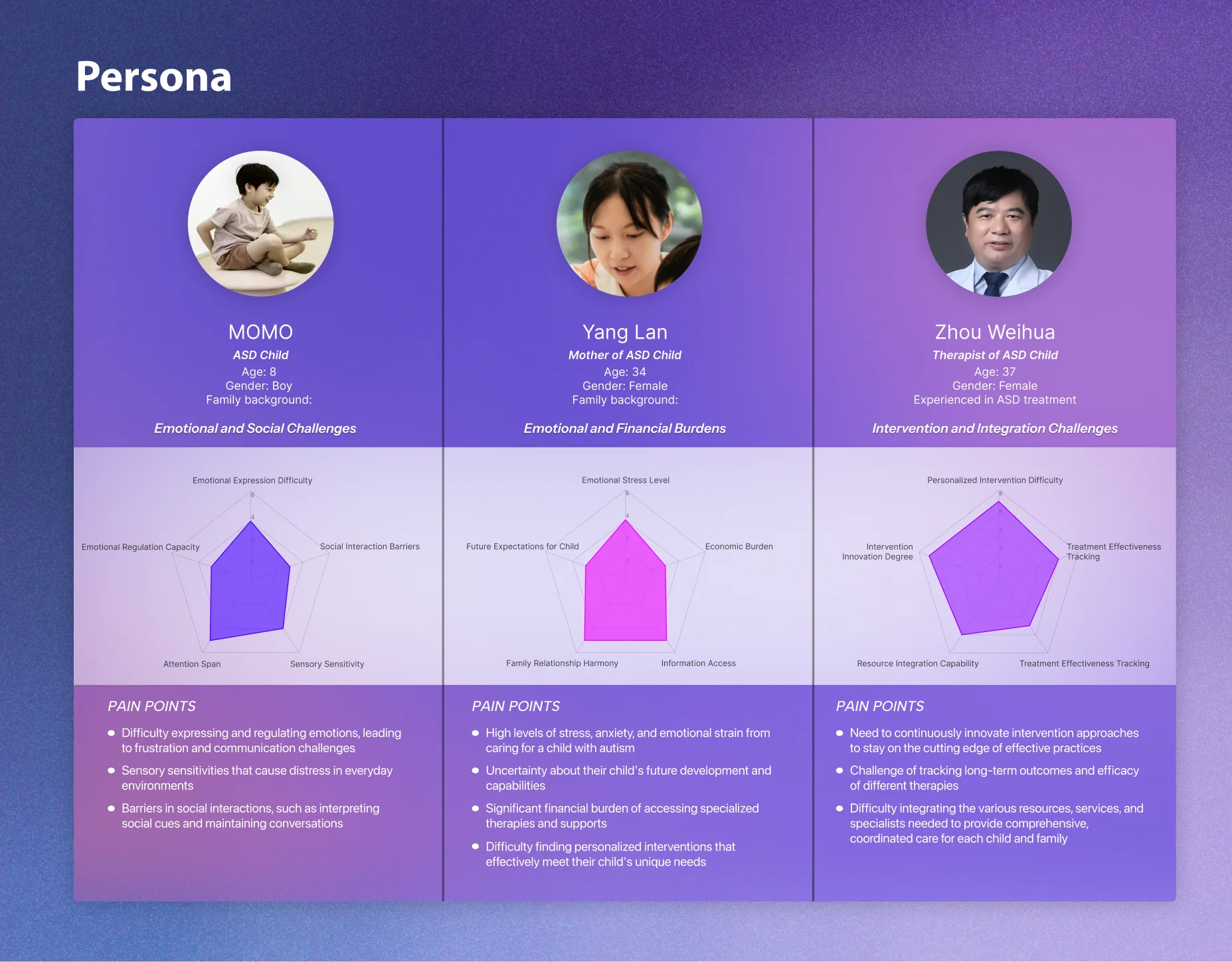
Three persona cards on purple: MOMO, an eight-year-old autistic boy; Yang Lan, a 34-year-old mother; Zhou Weihua, a 37-year-old therapist. Each with a radar chart and pain points

MOMO, eight, struggles to express and regulate emotion and is distressed by sensory load. His mother Yang Lan carries the stress, the cost of specialized therapy, and the uncertainty about his future. His therapist Zhou Weihua needs to personalize interventions, track outcomes over time, and pull scattered resources into one plan.

Each of them needed the same thing from a different side: to know what he was feeling while it was happening.

Painting Over Music

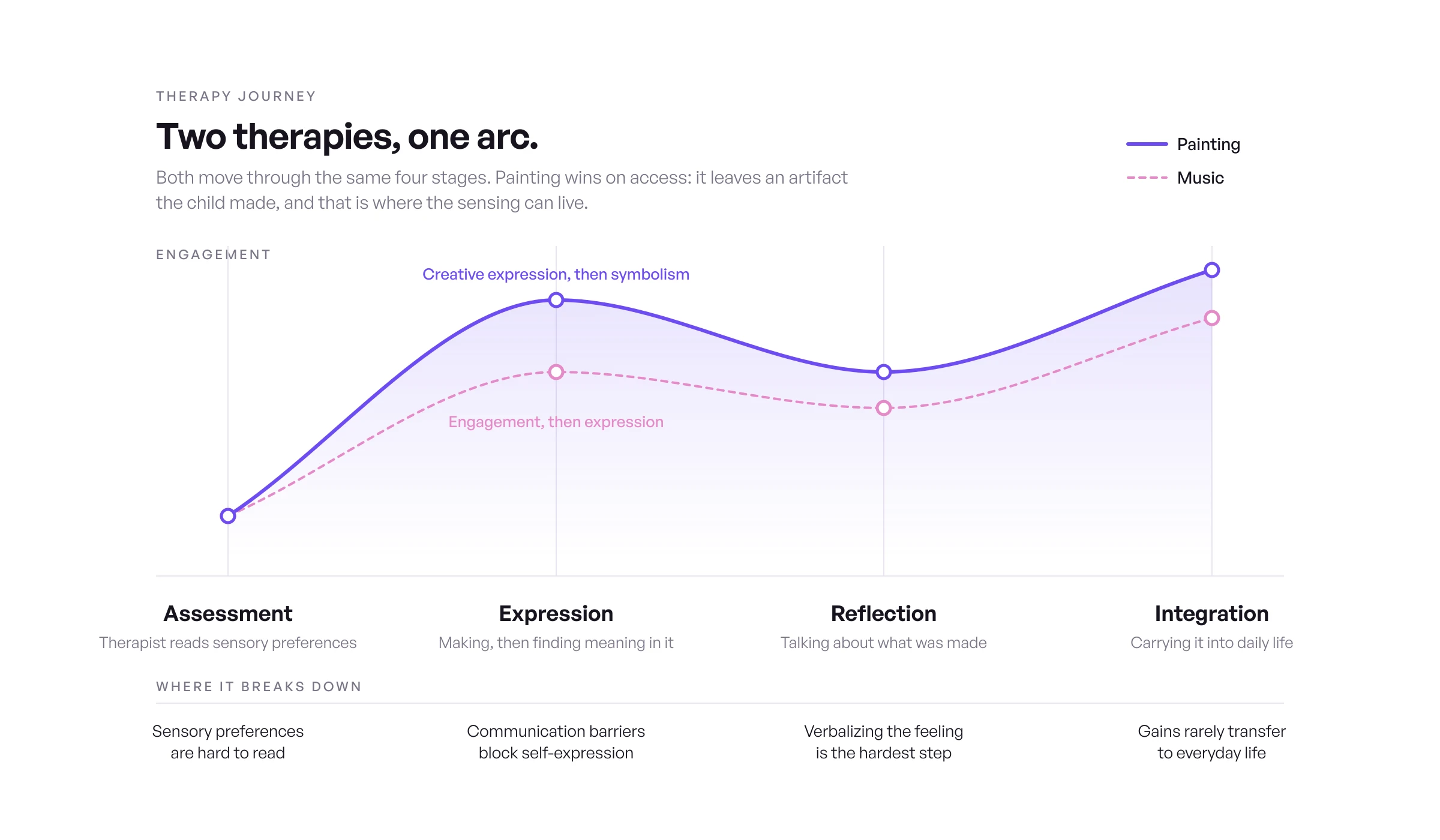
Therapy journey chart: painting and music art therapy move through the same four stages, assessment, expression, reflection, integration. An engagement curve for each, painting higher throughout, and the friction at every stage, from reading sensory preferences to carrying gains into daily life

Mapping the therapy journey stage by stage, painting and music share the same arc: assessment, expression, reflection, integration. Painting won on access. It leaves an artifact the child made, and that artifact is where the sensing can live.

How It Works

Six steps from pairing to a mood spectrum

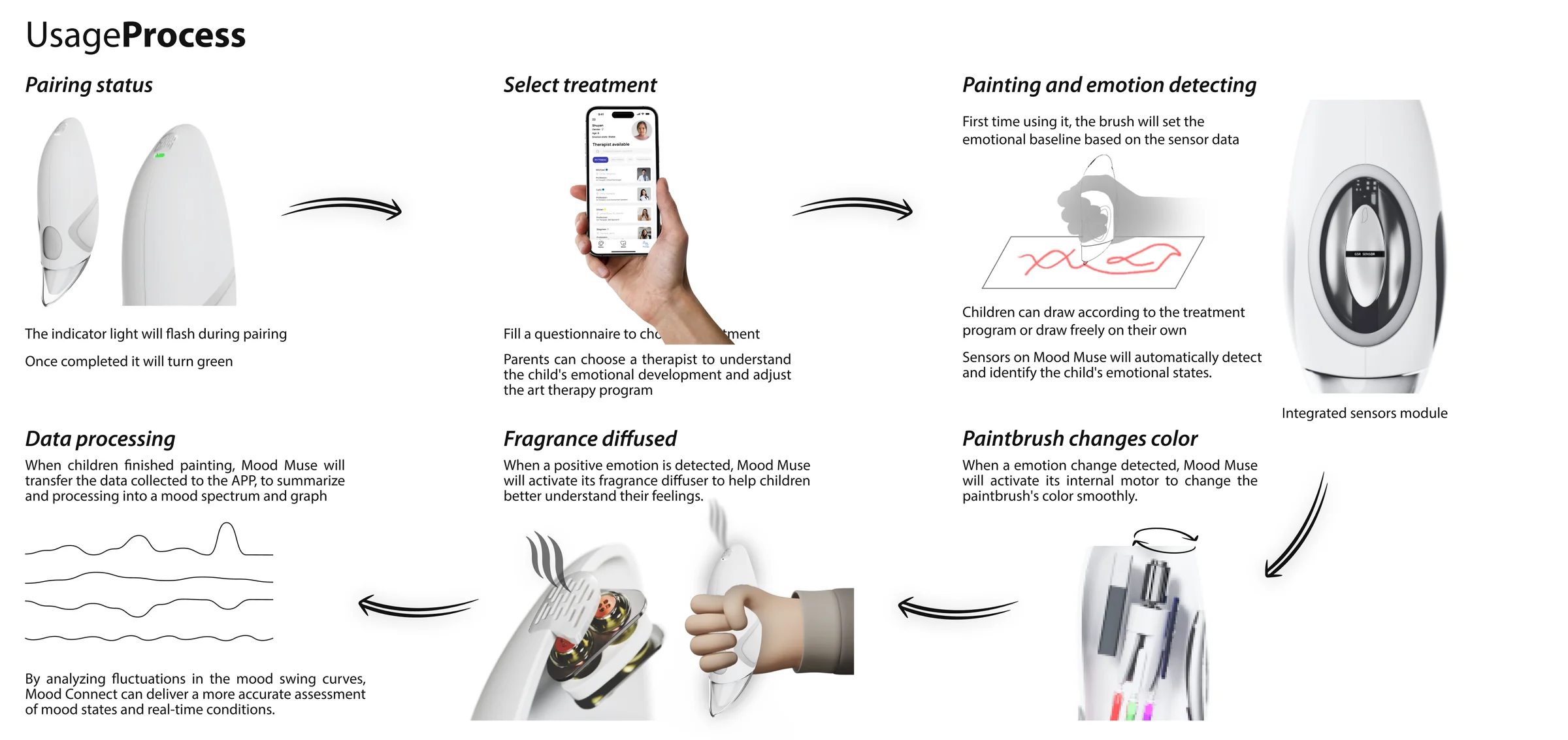
Six-step usage process with device renders: pairing, choosing a treatment, painting and emotion detection, data processing, fragrance diffused, paintbrush changes color

The Usage Loop

01

Pair

The indicator light flashes while the brush pairs with the phone, then turns green when it's connected.

02

Choose a Treatment

A questionnaire selects a program. Parents can bring in a therapist to read the child's development and adjust it.

03

Paint

On first use the brush sets an emotional baseline. Then the child paints, following the program or freely, while the sensors keep reading.

04

Process

When the painting is done, the brush sends the session to the app, which summarizes it into a mood spectrum and graph.

05

Scent

When a positive state is detected, the brush releases a gentle fragrance, a reward that helps the child connect the feeling to the moment.

06

Color

When the state changes, an internal motor smoothly changes the ink color, and the child sees their own shift on the paper.

Nothing in the loop asks the child to stop and report. The reporting is the painting.

The Brush

Sensors in the grip, ink in the body

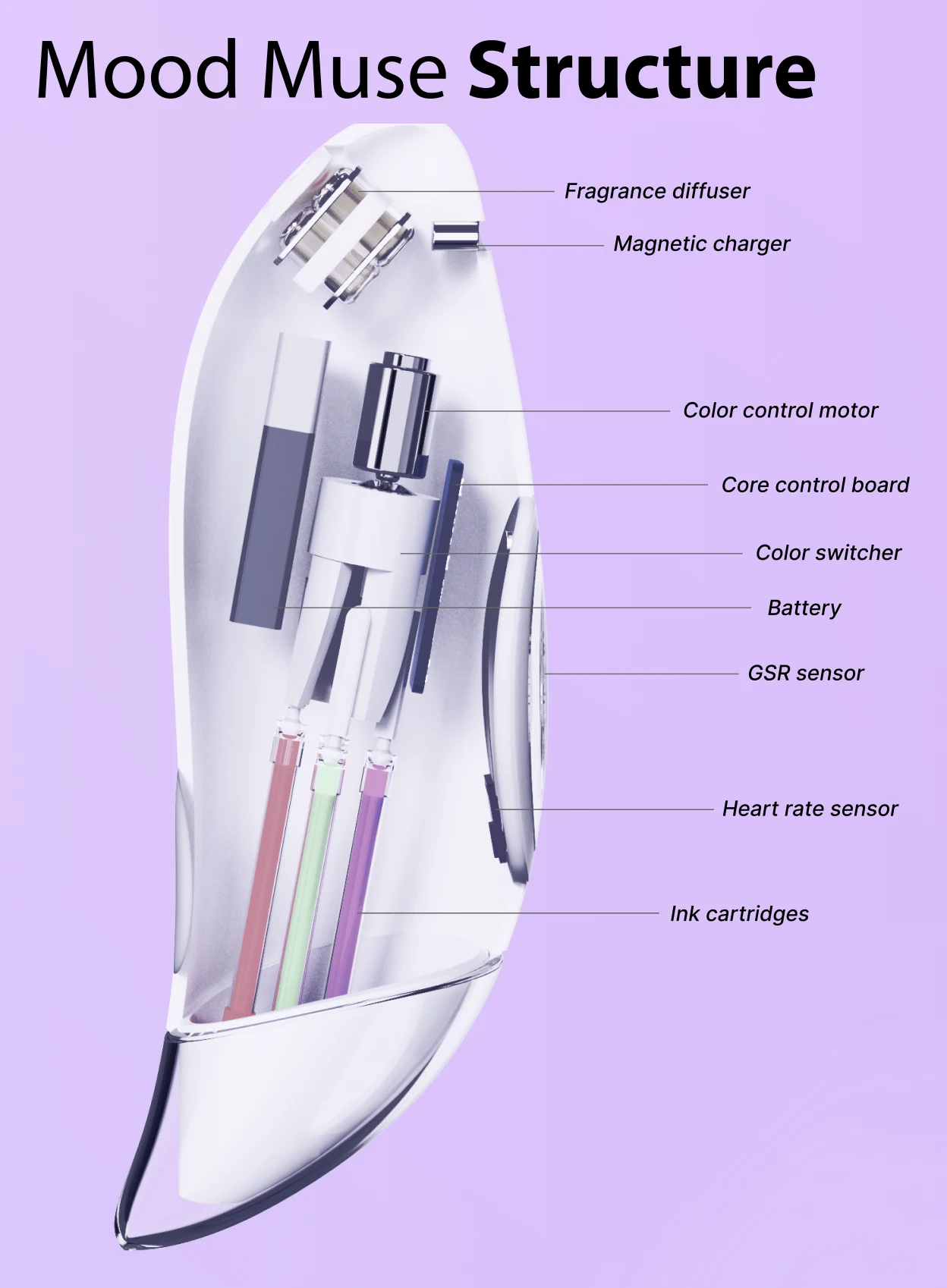
Side view of the white brush, a translucent view of its motor, board, battery and ink tubes, and the four ink cartridges in red, black, green, and purple

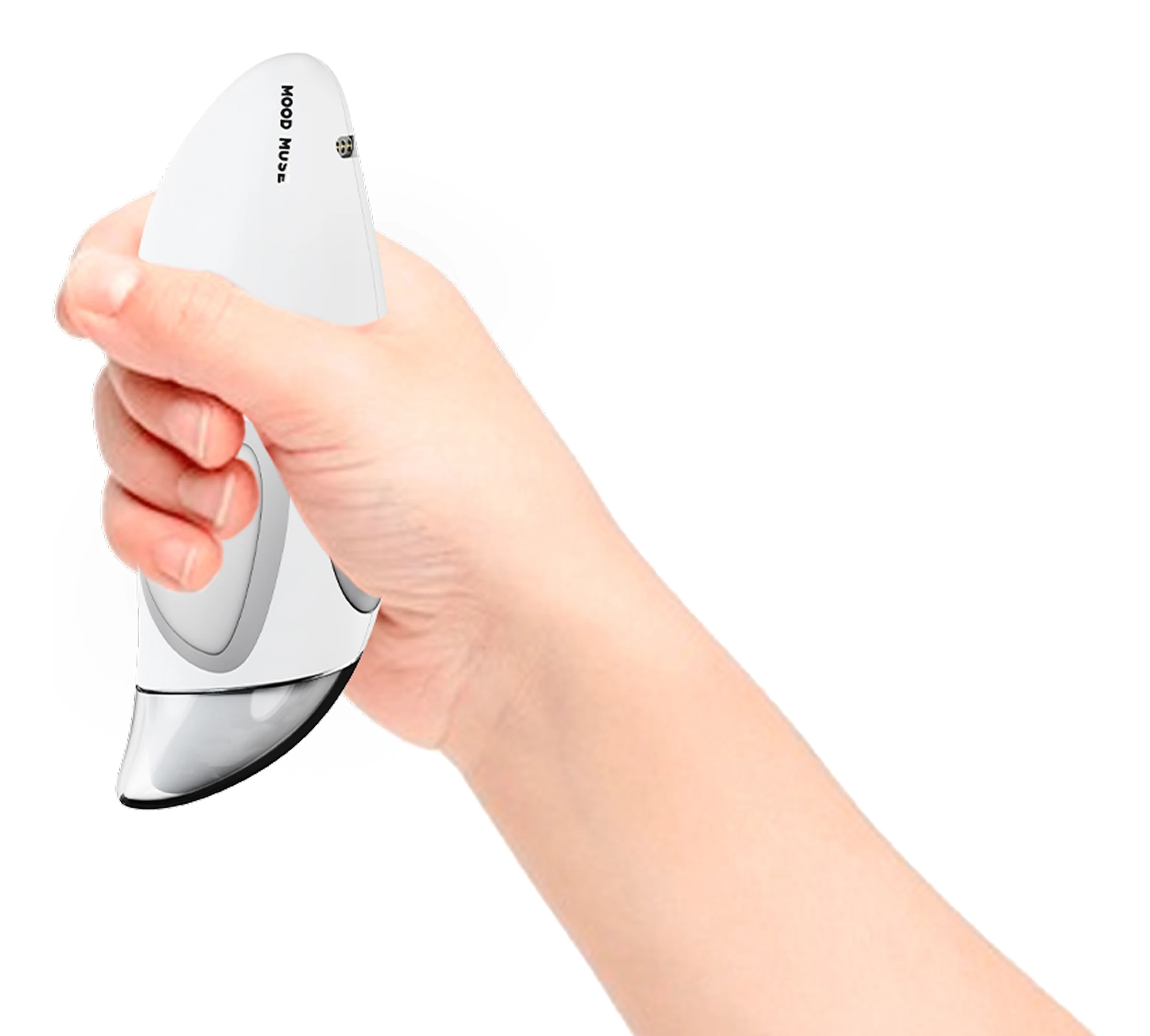
The brush is a soft white body sized for a child's hand, with the sensing surfaces where the fingers naturally land and the mechanism stacked along the spine.

A child's hand gripping the white brush, with the Mood Muse logo and one magnetic charging contact visible near the tail

Two Signals

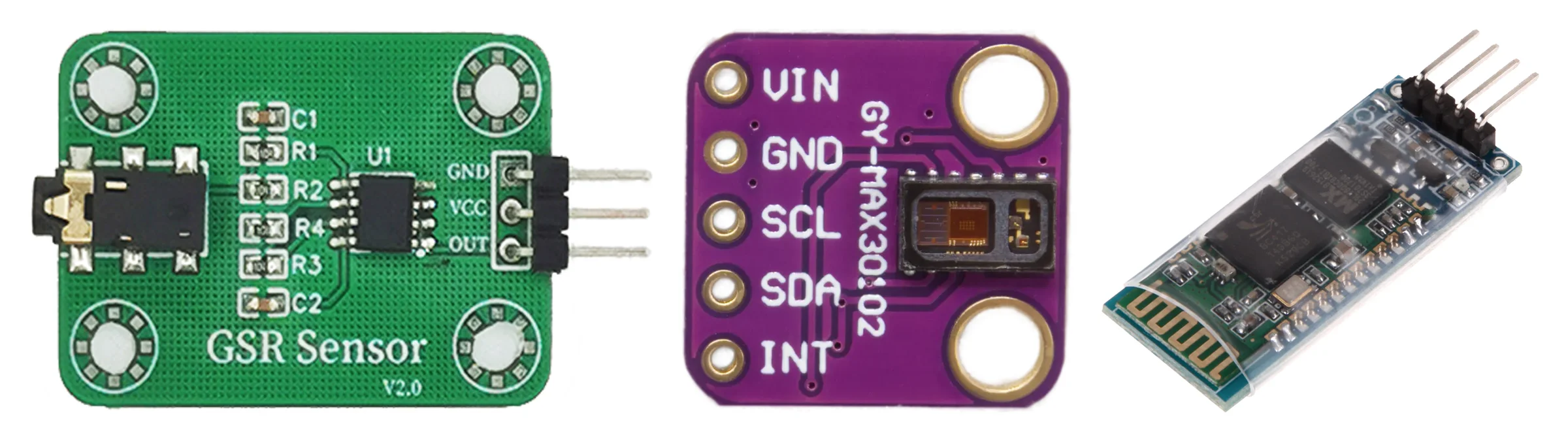
A GSR sensor reads skin conductance, which follows sympathetic arousal: excitement, anxiety, stress. A heart-rate sensor reads beats per minute and heart-rate variability, which carry both arousal and valence depending on context. Together they give the classifier something to work with that doesn't depend on a face or a voice.

Three sensor modules side by side: a GSR skin-conductance board, a MAX30102 heart-rate module, and an HC-06 Bluetooth module

From Signal to State

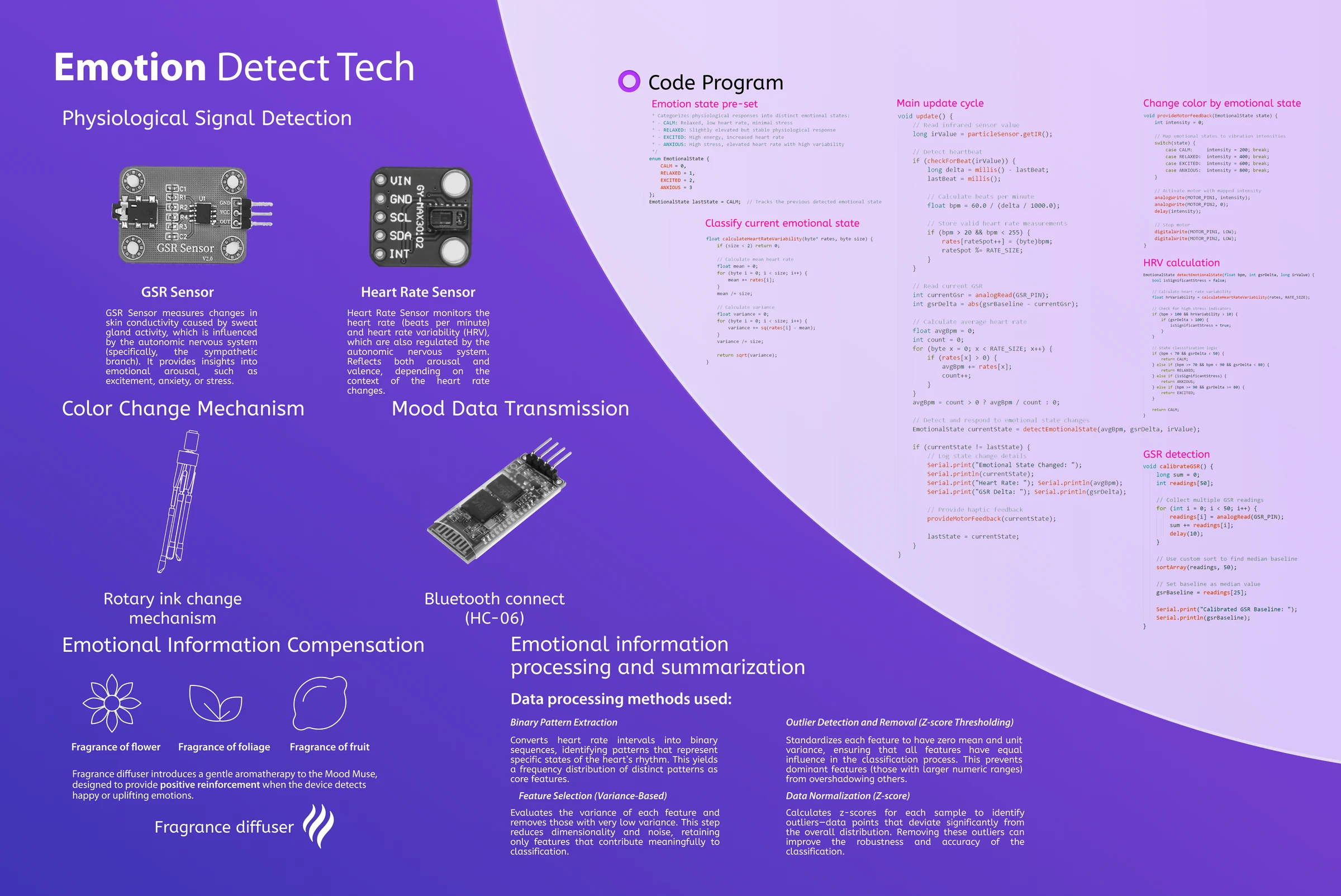
The firmware runs an update loop: read GSR and heart rate, compute HRV, classify the current state against the pre-set baseline, and drive the color output. Heart-rate intervals are converted into binary patterns whose frequency distribution becomes the core feature set; low-variance features are dropped, values are z-score normalized, and outliers are removed by z-score thresholding before classification. Sessions transmit to the app over Bluetooth (HC-06).

Emotion detection panel: GSR and heart-rate sensing, the classification loop, the code, Bluetooth transmission, and the data-processing methods

Color as Feedback

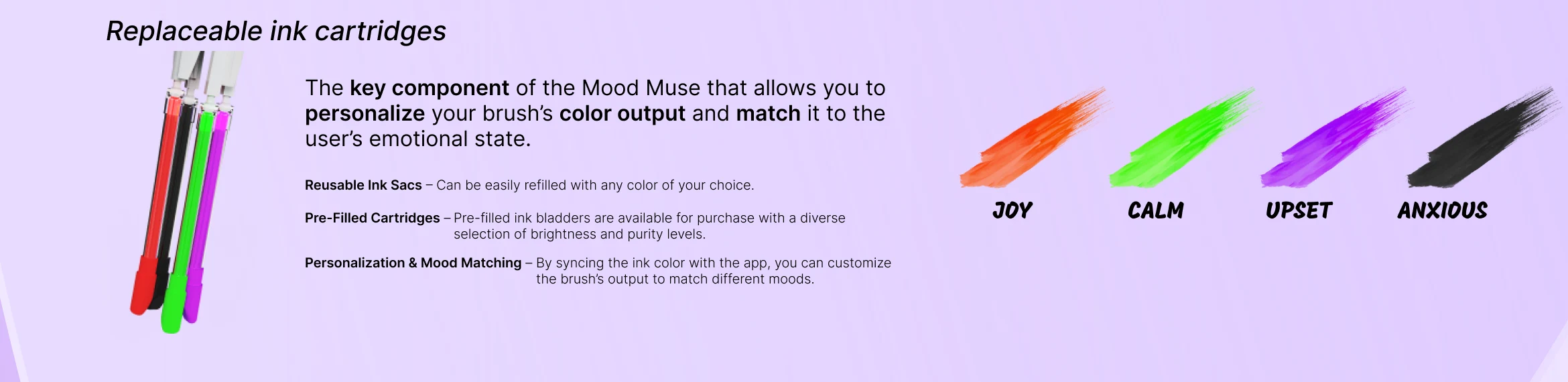
A rotary ink-change mechanism sits at the heart of the body: four replaceable cartridges, JOY, CALM, UPSET, ANXIOUS, and a color control motor that switches between them as the state changes. Sacs can be refilled with any color, or pre-filled cartridges bought in different brightness and purity levels, and the mapping between color and mood is set from the app.

Replaceable ink cartridges: the refillable ink sacs beside four paint strokes labelled JOY in orange, CALM in green, UPSET in purple, and ANXIOUS in black

Everything Else in the Body

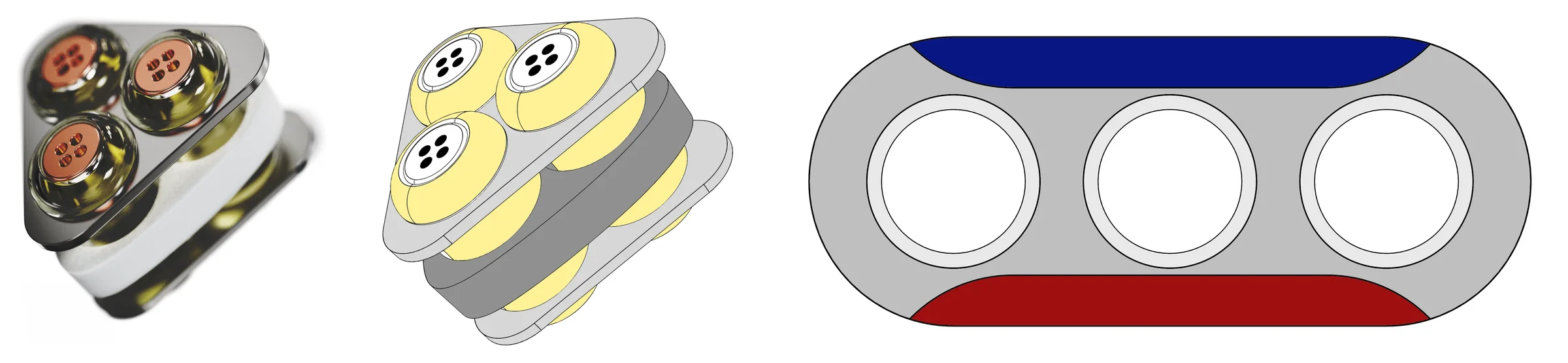
Core control board, battery, color switcher, and the two sensors stack behind the cartridges. A magnetic charger receptacle at the tail self-orients, carries 45W charging, and doubles as the data port. A fragrance diffuser holds three essential oils, flower, foliage, and fruit, and releases them as positive reinforcement when the brush detects an uplifting state.

Exploded view of the brush body with callouts for the fragrance diffuser, magnetic charger, color control motor, core control board, color switcher, battery, GSR sensor, heart rate sensor, and ink cartridges
The three-pod essential-oil diffuser render, a flat drawing of the diffuser, and a drawing of the magnetic charger receptacle with N and S poles and three contacts

Held, Not Operated

Silicone patches sit exactly where the hand puts pressure, and the two pressure zones double as the sensor contact points. There is no screen and no button to press mid-session.

An open palm marked with Pressure Zone 1 and 2 and the heart rate and GSR sensor detection areas

A child shouldn't have to operate a device to be understood by it. The brush is held the way any brush is held.

Mood Connect

The session becomes something two adults can read

Mood Connect is the app on the other end of the brush, and it has two users who are not the child: the parent and the therapist.

Setup

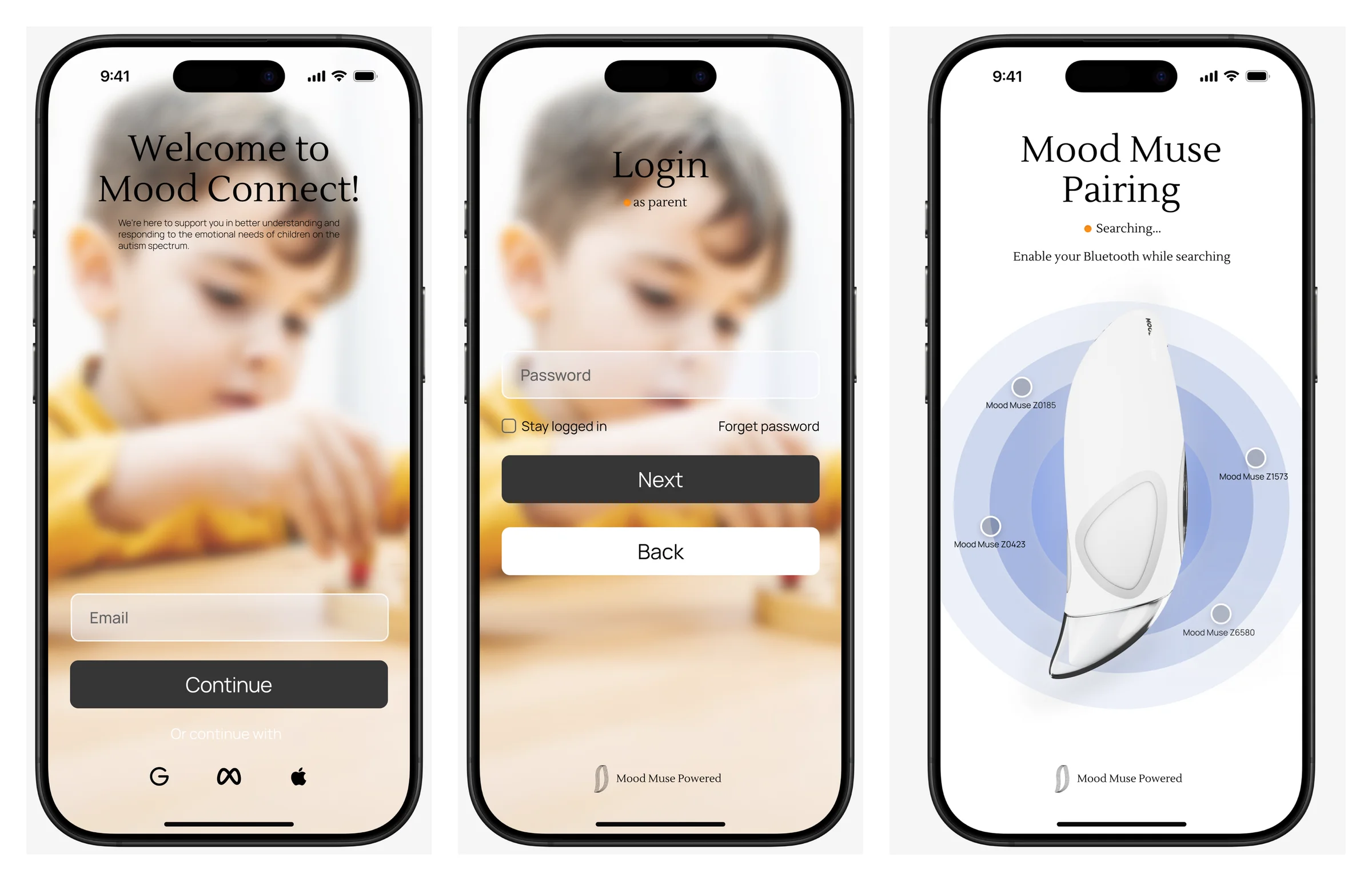
Parents register, add a child, and pair the brush from device settings. Therapists register with their license and affiliation and are verified before they see anything.

Three Mood Connect screens: welcome with a child painting photo, parent login, and Mood Muse pairing with the brush on a radar of nearby devices

Reading a Session

A general emotion state ring gives the day at a glance. The memory slider stacks past paintings on a timeline, and each one carries its mood spectrum. The analysis view breaks a period into its proportions and sits next to standardized assessment scores, so the therapist sees the brush's reading and the clinical baseline in one place.

Three screens: a General Emotion State ring scoring 86 with recent paintings, the All Paintings memory slider over a child's tree drawing, and an Emotion Analysis breakdown with assessment charts

Two Dashboards, One Child

Parents get mood summaries, quick interventions such as guided drawing prompts, drawing history, and exportable reports. Therapists get analytics, progress tracking, multi-patient management, and drawing modules they can assign. Secure messaging connects the two, and the parent decides what the therapist sees and how often.

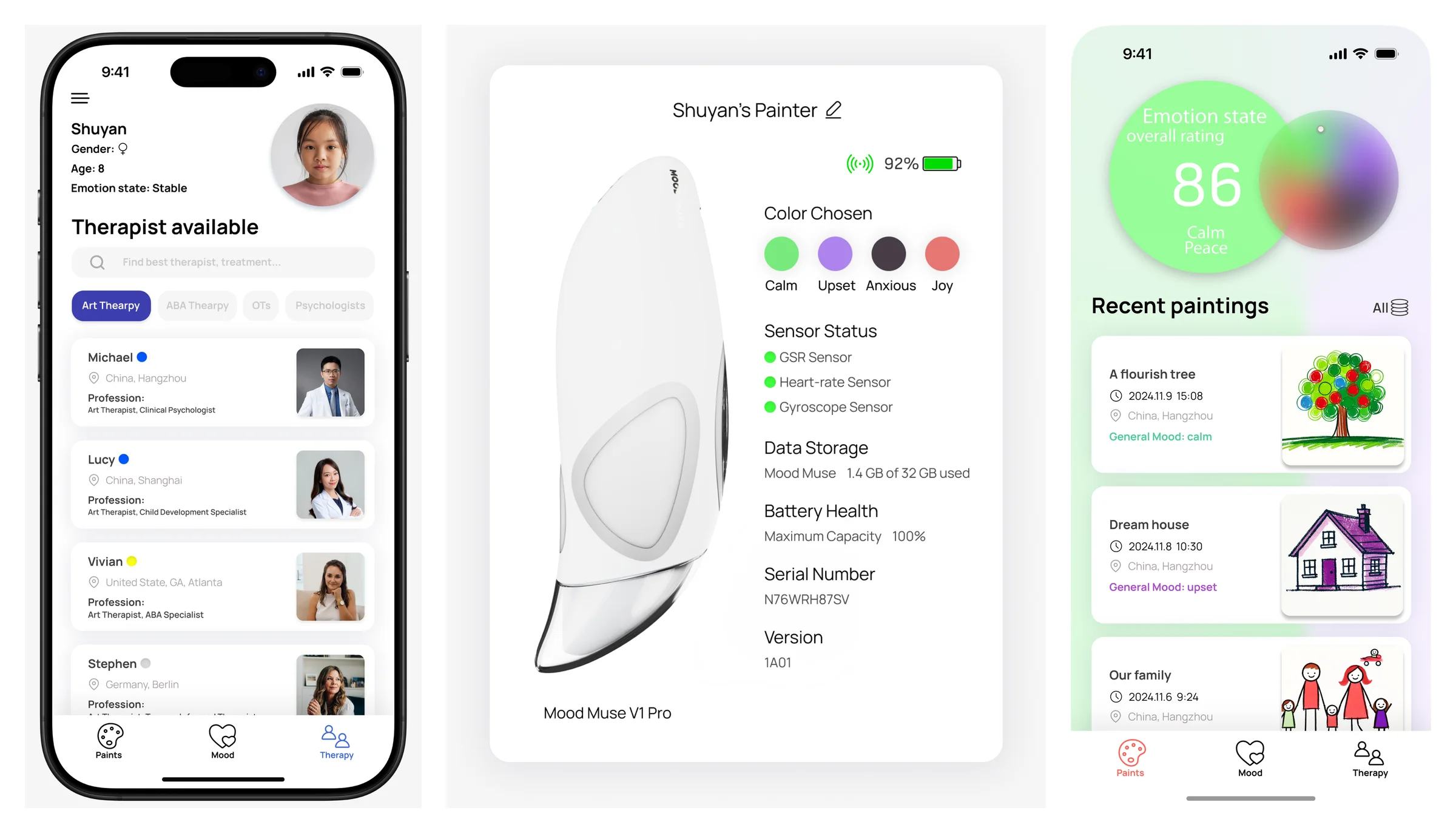
Therapist list for a child named Shuyan, the About card for Shuyan's Mood Muse showing battery, sensors, storage and serial, and a green emotion-score dashboard with recent paintings
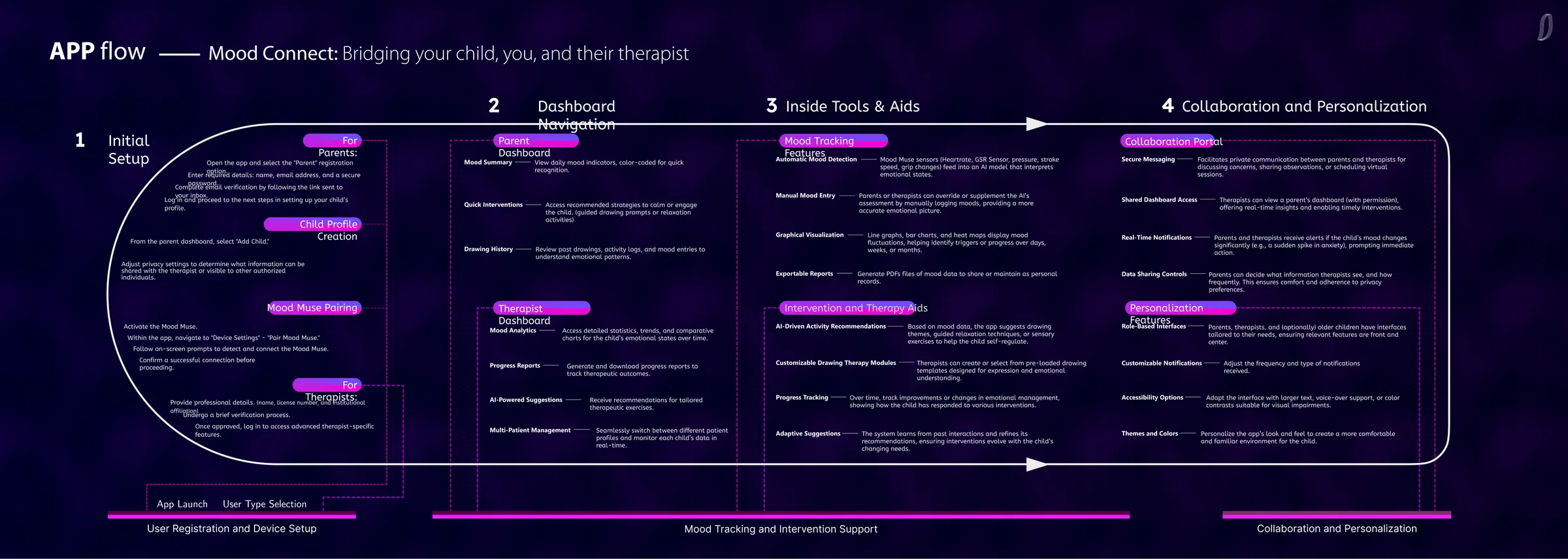
Dark app-flow diagram, Mood Connect: bridging your child, you, and their therapist, in four stages: initial setup, dashboard navigation, tools and aids, collaboration and personalization

The Shape of the App

Everything hangs off one split at the door. A parent account opens into setup, device pairing, and a feature hub for paintings, mood, and therapy. A therapist account opens into patients, scheduling, and a professional profile. The two trees only meet where the parent has allowed them to.

Why These Colors

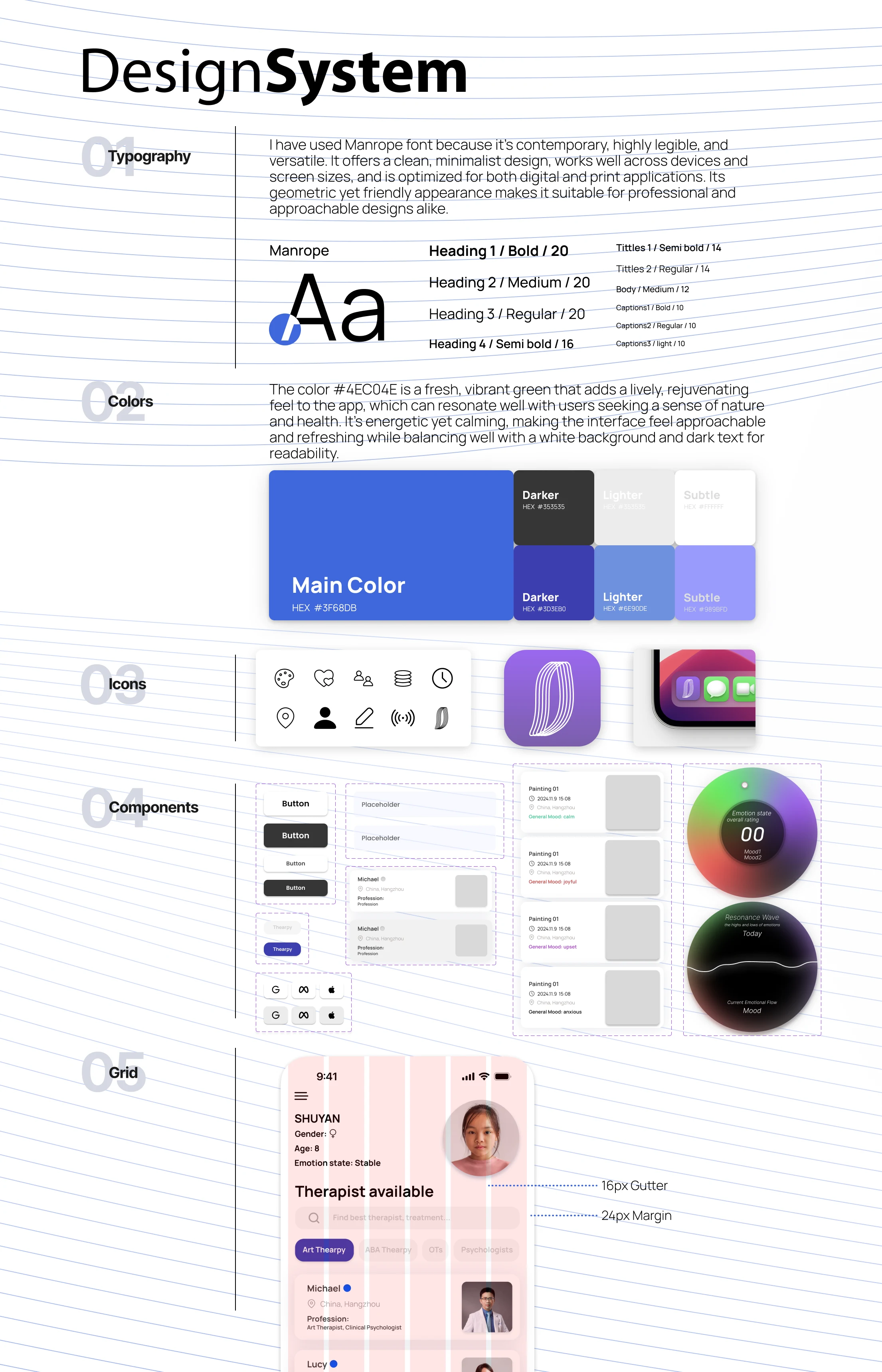
The palette is built around a calm blue with a fresh green accent, and the four ink colors follow the literature we found on how autistic children use color: darker for negative feelings, brighter for positive ones (Wolfe and Fink, 2004), with cooler tones calming and high-saturation warm tones risking overstimulation (Ehlers and Gillberg, 1993). Type is Manrope, chosen for legibility at small sizes.

The Mood Connect design system: Manrope type scale, the main blue palette with hex values, the icon set, components, and the 16px gutter and 24px margin grid
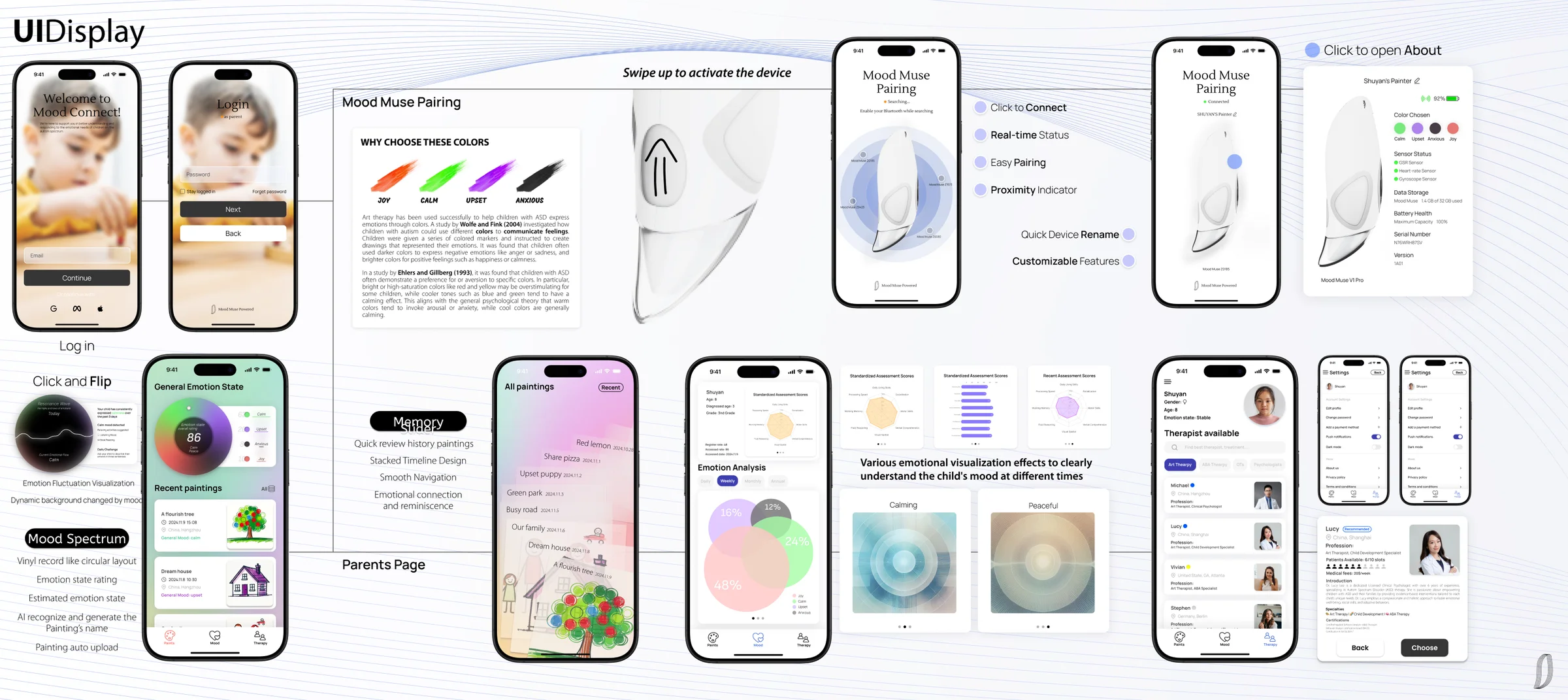
The full UI display board: fourteen phone mockups with feature captions for pairing, status, memory slider, mood spectrum, parents page, and therapist profile

Built

A brush that works, not a brush that renders

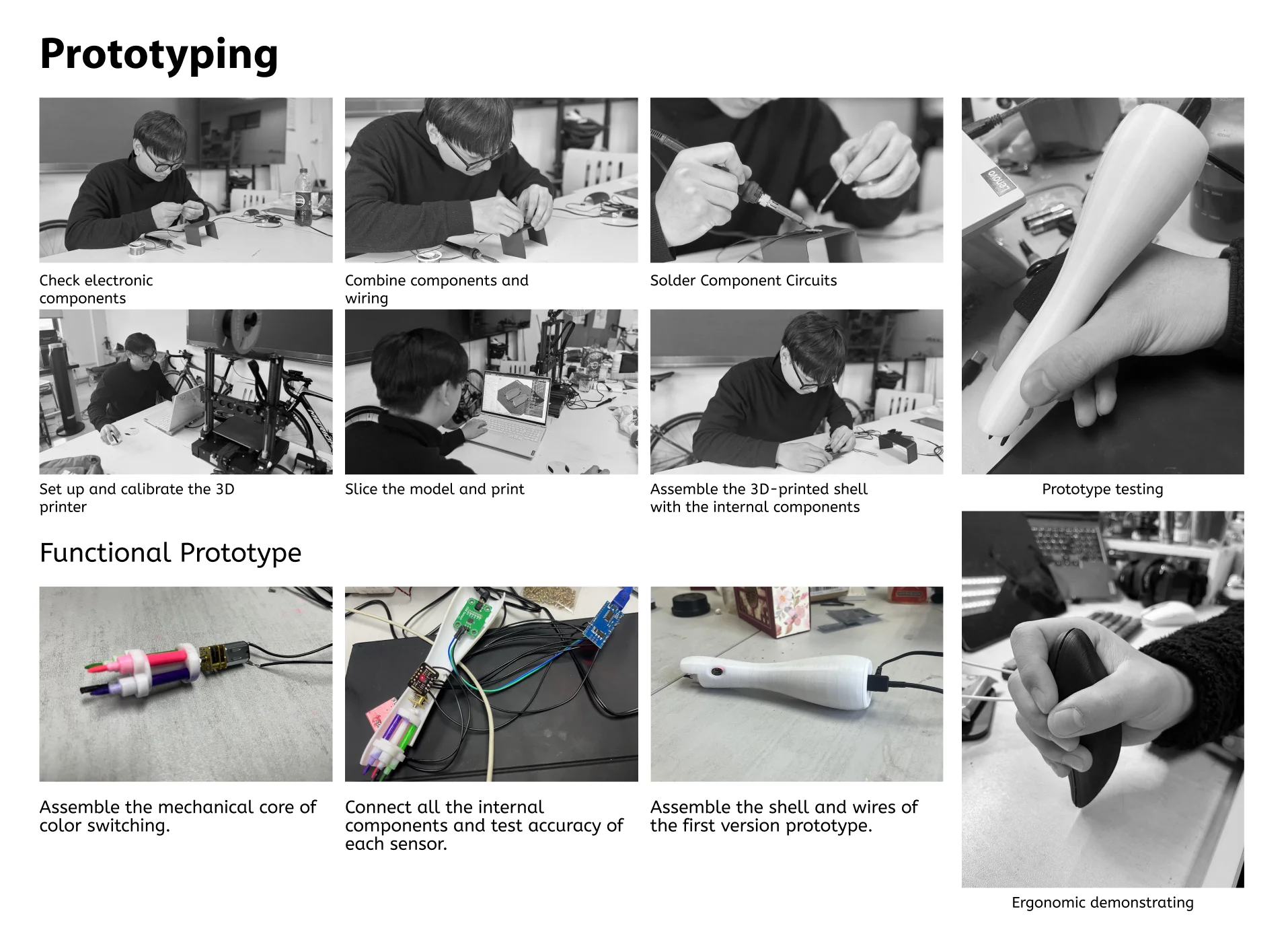
Black-and-white prototyping grid: checking electronic components, wiring, soldering, 3D printer setup, slicing and printing, shell assembly, the mechanical core of the color switcher, sensor testing, and the assembled first prototype

We checked and wired the components, soldered the circuits, calibrated the printer, sliced and printed the shell, and assembled it around the electronics. The mechanical core of the color switcher was built and tested on its own before it went into the body, and each sensor was checked for accuracy on a test rig before the first full prototype was closed up.

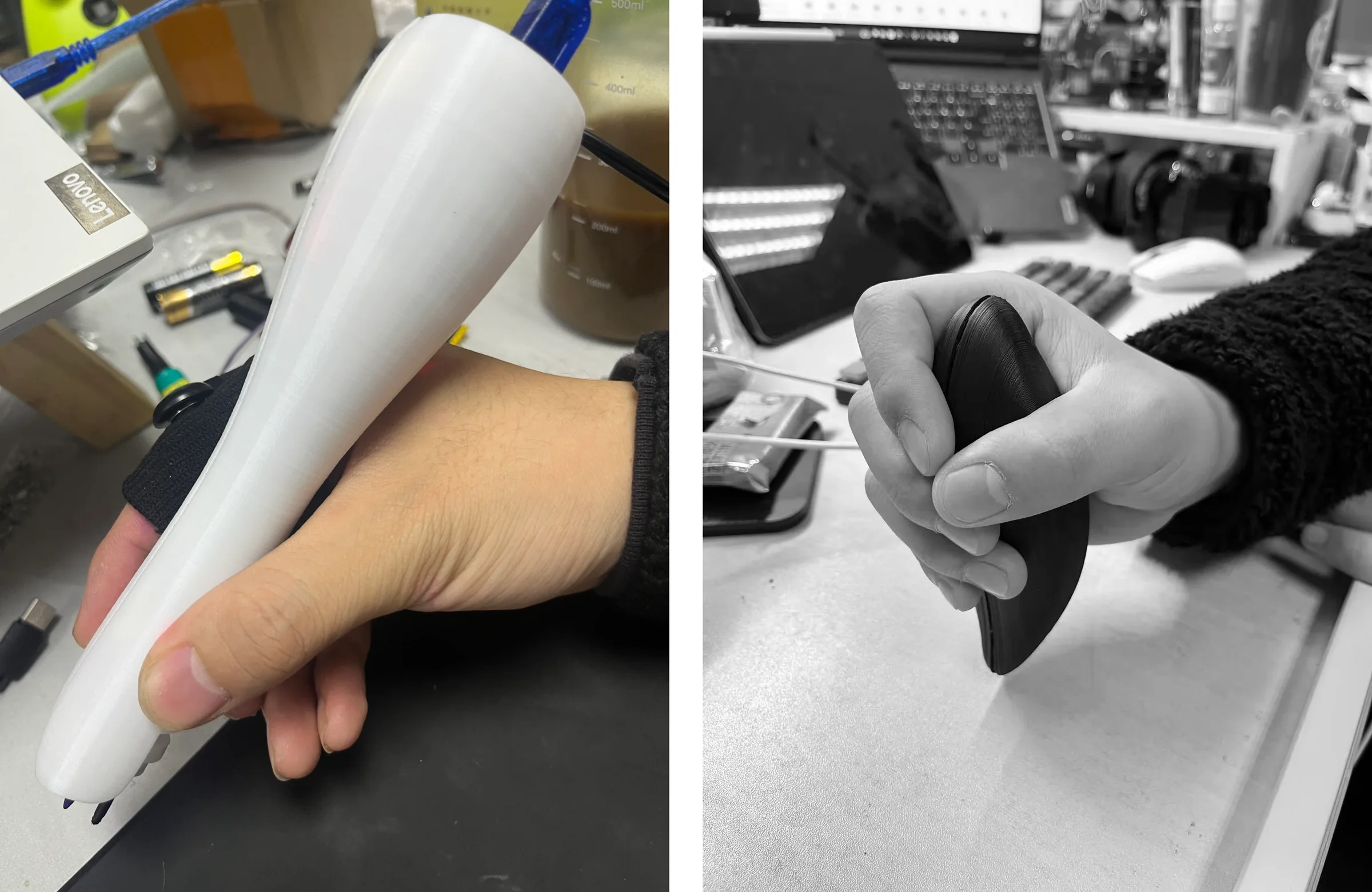
A hand holding the white 3D-printed prototype at a workbench, and a hand gripping the dark prototype on a desk

The prototype exists so the ergonomics could be argued with a hand instead of a slide.

Reflection

What the sensors can and cannot promise

The Claim I Kept Small

GSR and heart rate measure arousal well and valence poorly. The brush can tell that something is happening in the child; the labels JOY, CALM, UPSET, ANXIOUS are the classifier's best reading against a baseline, not a diagnosis. I kept the language honest in the app, and I'd keep it honest with families.

The Question I'd Ask First

A device that senses a child continuously has to earn that. The parent controls what the therapist sees, but the child doesn't control what the brush hears. Co-design with families and occupational therapists is the next step, not a nice-to-have.

What I'd Do Next

Validate the classifier against real therapy sessions rather than a bench rig, test the color and scent feedback for sensory tolerance with the children it's for, and put the prototype in a classroom.

Next up

Oryne

0→1 Product Designer & Builder · 2026App Store
AI-NativeMotion DesignDesign Engineering

Locant

0→1 Product Designer & Builder · 2026GitHub
AI-NativeDesign Engineering

NeuraLyfe

Product Designer, Maker · 2026
Data VisualizationAI-NativePhysical Prototyping