A Mac app for pointing a coding agent at the element you mean,
so the words you type are only about the change.
Intro
A click says which element. The note says what to change.
Locant is a free, open-source Mac app for pointing a coding agent at the exact element you mean. Click it in any app, type what should change, and the agent gets the element itself: its identifier, its frame, its place in the tree, and a crop.
I design and build my own apps end to end, and a coding agent does most of the typing. Seeing what was wrong took a second. Describing it took the rest: which screen, which component, where it sits in the tree, and then the change itself, in words the agent would read the way I meant them. That attention went into translation, not design.
I made Locant for Palantir's Product Design Show & Tell. Versions 0.1 to 0.4 were built inside the three-hour window, timer running. Four days later it was at 0.8: signed, notarized, public on GitHub, and an MCP server as well.
Role
0→1 Product Designer & Builder
Timeline
3 Hours to v0.4 · 4 Days to v0.8
Sep 13 to 16, 2026
Made For
Palantir Product Design
Show & Tell
Scope
A Spec for Every Version
Interaction and Visual Design
Swift App and MCP Server
Site, Film, and Measurement
Tools
Swift 6 · AppKit + SwiftUI
Claude Design · Claude Code
Output
Free and Open Source · v0.8
Signed, Notarized · MCP Server
Highlights
One capture, and the agent goes straight to the right file
The agent: the payload pasted into Cursor, and the edit lands in SeedScreenshot.swift
The element, not a screenshotAny Mac app, any agentAsked which orb: 0 of 12 runsv0.1 to v0.4 in three hours
Any agent: the same payload in Cursor, Claude Code, Codex, and Antigravity
Before & After: one click flips between the orb before and after the edit
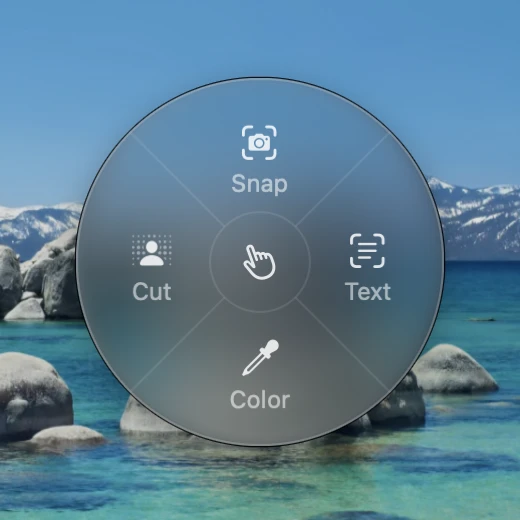
The ring: hold the ball, then release on an action
Color: a magnifier on the pixel, and the value copied
The Problem
Every fix needed two descriptions, and the first ate the second
UI polish starts as something seen: a button that should be rounder, a card that needs room. A coding agent works in text and code. Every fix meant translating one into the other, and the translation was mine to do.
First, which element: which screen, which component, where it sits in the tree, in names the agent could match to the code. Then, what should change. The first kept eating the second. By the time I had written which button, I had lost what I was actually going to say about it.
Before: a whole sentence about which orb, and not yet a word about the change
A screenshot doesn't remove that work. It hands the first half to the agent. Given a crop of the phone and a note that already said how to make the change, this is what it said:
Claude Code, given a screenshot
“I haven’t changed anything yet, because the screenshot doesn’t show which orb you mean. …
Which orb should get them?”
Opus 5 at medium effort, given a crop of the phone and a note that already said how to make the change. Measurement run, September 15, 2026.
It understood the change, down to the mechanism. It could not know which orb. That is the half Locant takes.
Landscape
Web tools point at elements. Mac tools send the window.
In September 2026, three kinds of tool handed a screen to a coding agent, and screenshot tools sat under all of them. None let a person point at one element in a native app and hand it to whichever agent they use.
Tool
You point
One element
Any agent
Native apps
Codex Appshots, Claude Desktop quick entry
You point: yes. You point · A double-tap
One element: no. One element · The window or a region
Any agent: no. Any agent · Their own agent
Native apps: yes. Native apps · Any Mac app
Agentation, Stagewise, Cursor Design Mode
You point: yes. You point · A click
One element: yes. One element · The DOM node
Any agent: partly. Any agent · Depends on the tool
Native apps: no. Native apps · Web pages only
Peekaboo, Xcode 27 Device Hub
You point: no. You point · The agent looks for itself
One element: yes. One element · The accessibility tree
Any agent: partly. Any agent · Over MCP, or in Xcode
Native apps: yes. Native apps · Mac apps, the Simulator
CleanShot X, Shottr
You point: yes. You point · A drag
One element: no. One element · Pixels
Any agent: yes. Any agent · An image, anywhere
Native apps: yes. Native apps · Any Mac app
Locant
You point: yes. You point · A click, with your note
One element: yes. One element · Identifier, frame, and path
Any agent: yes. Any agent · Clipboard and MCP
Native apps: yes. Native apps · Any Mac app, and the Simulator
That research changed three things before any code. No window capture, because two platforms already send the window. A payload of plain text with an image path, because agents handled MCP image blocks unevenly. And field names with no Apple prefix, so another platform could write the same shape.
Appshots gives your agent the window. Locant gives it the element.
Decisions
A pixel is a guess. An identifier can be grepped.
Before any code, one sentence set the feel: Locant should read like something macOS grew, in the family of the ⌘⇧4 crosshair, Live Text, and Spotlight. It appears, is used, and is gone. Three rules followed from it.
· Borrow, don't brand. System accent, system type, system materials. The only mark of its own is the pointing hand.
· Nothing lingers. Every surface dismisses itself, and a confirmation lasts one second.
· Quiet until approached. Nothing pulses, bounces, or waits for you to notice it.
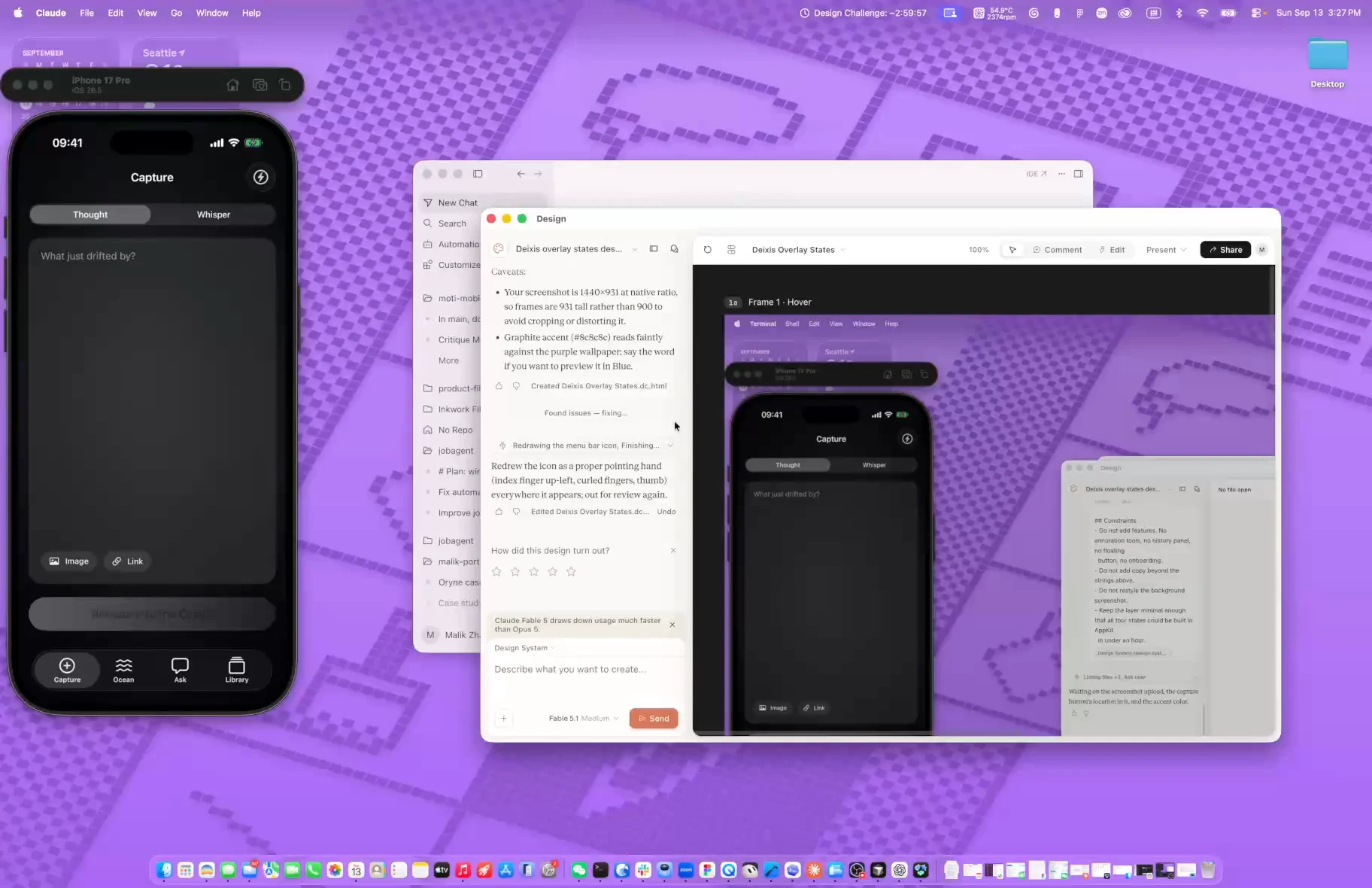
Claude Design: the overlay's states, drawn before any code, three seconds into the timer
The accessibility tree, not the pixels
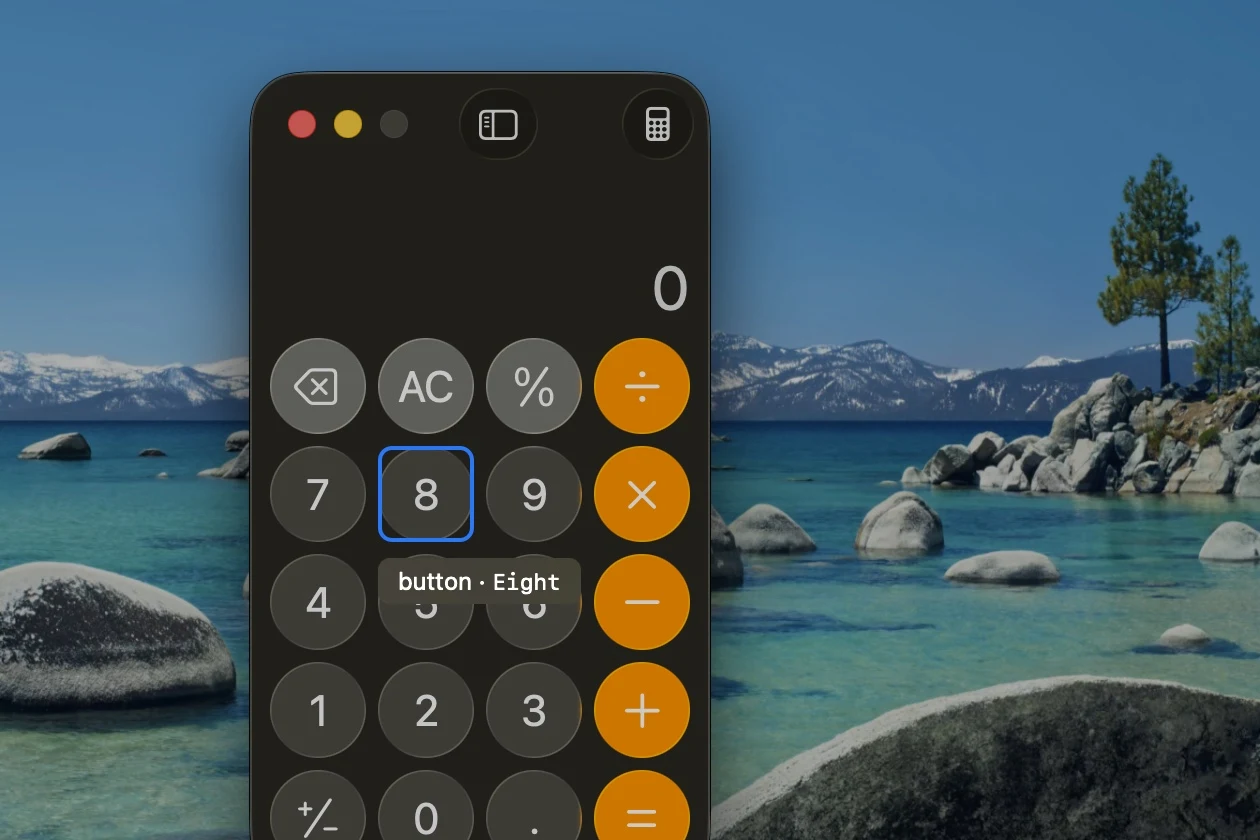
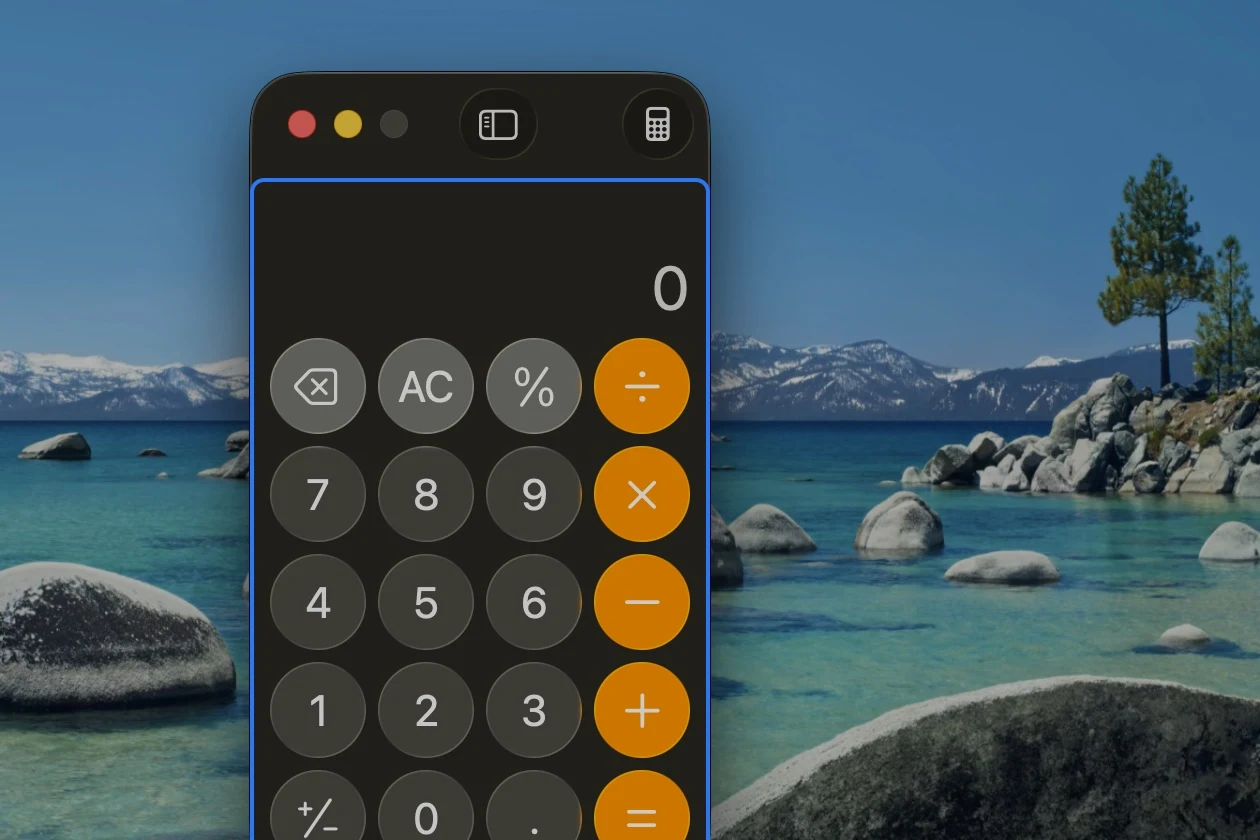
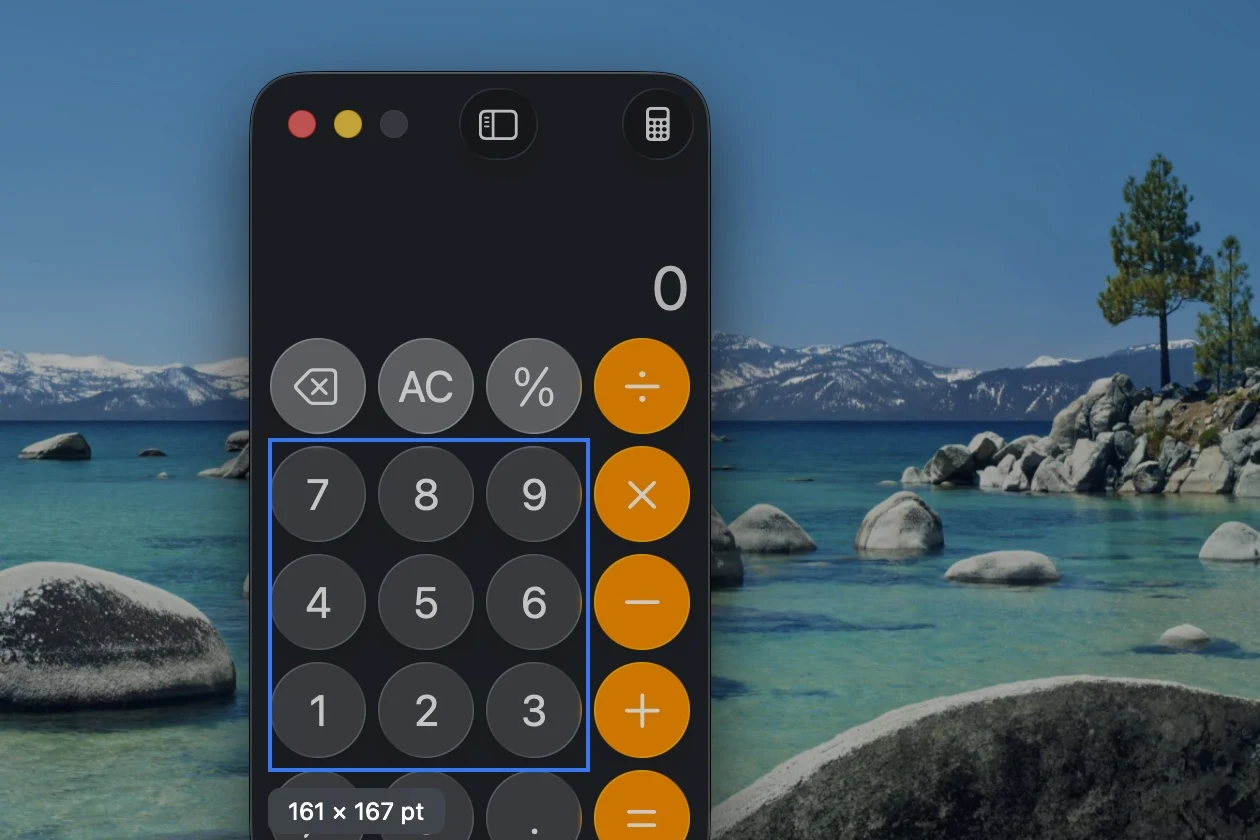
Every native app already carries the answer in its accessibility tree: a role, a label, and often the exact identifier its code uses. A pixel is a guess. An identifier is something an agent can search the code for. The overlay shows it on hover, before the click, so you know what the agent will get.
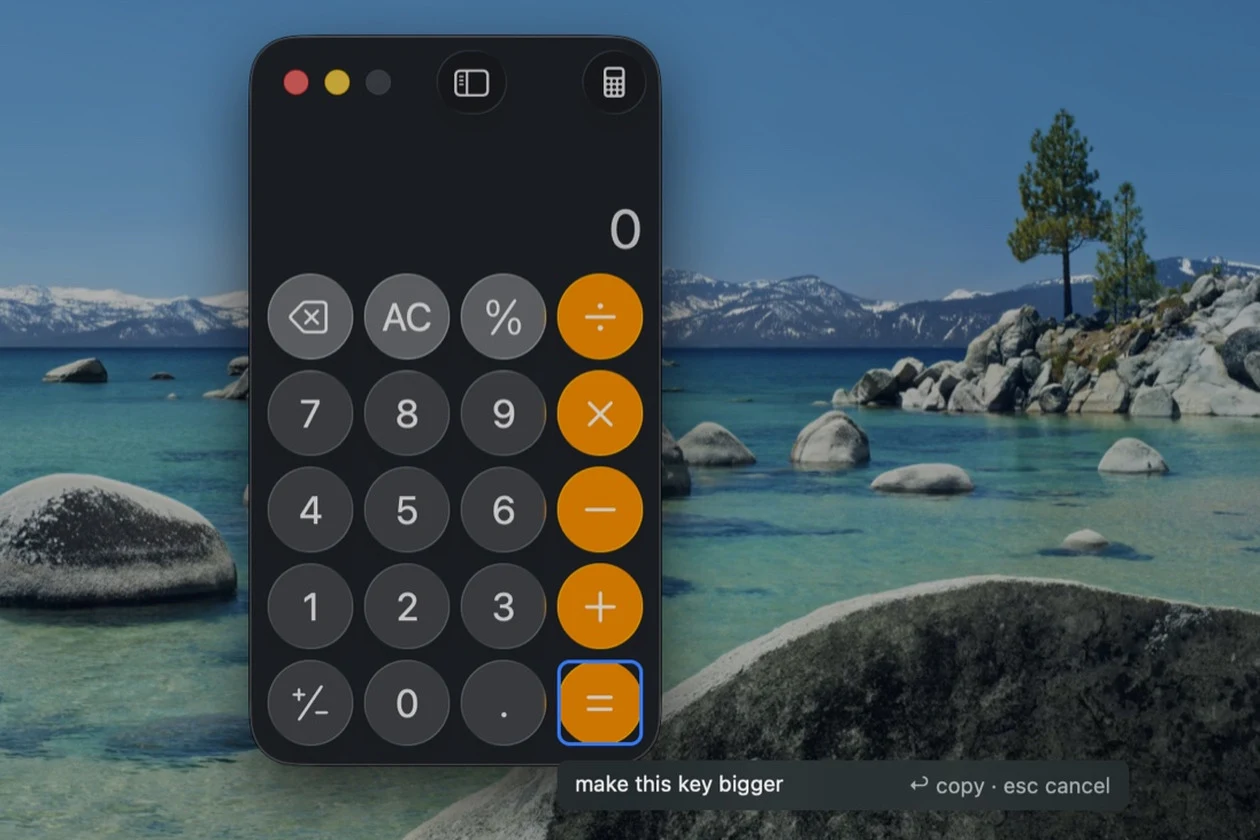
Hover: the element under the cursor, and its identifier
Option: one level up, to the keypad that holds it
Drag: a frame, with every element inside it listed
Note: what should change, then Return
It leaves as plain Markdown with the image path first, because a terminal agent receives only the text on paste. This is the capture in the clips above, as Locant wrote it:
## Locant capture (fix)Image: /Users/malik/Pictures/Locant/locant-simulator-20260915-021609-zwec.pngApp: Simulator (com.inspireocean.app) · Window: iPhone 17 Pro – iOS 26.5Captured: 2026-09-15 02:16 · Image region: 139×183 pt @2x (element + 40 pt)Project: /Users/malik/Documents/inspire-ocean### Target elementbutton "Product Ideas" · id=oceanCurrent.product ideasFrame: x=152.7 y=-1335.3 w=58 h=102Path: application > window > group > button#oceanCurrent.product ideas### Notemake this orb bigger, with satellite nodes like Light And Color
A ladder when there is no element
Not every view has a name. Views drawn in SpriteKit, Canvas, or Metal expose pixels nobody labeled. So a capture steps down a ladder, and says which rung it reached.
01
Identifier
button · id=captureButton
An element with a declared identifier. The best case.
02
Label only
button "Save changes" · no identifier
The nearest labeled neighbors are named too.
03
Drawn frame
Elements in frame (6)
Drag on the overlay, and everything inside is listed.
04
Text and neighbors
Text in image · Nearby
Words in the image are recognized.
05
Image
No element information available
The payload says so, and still carries your note.
The agent always gets something to grep, or an honest null.
One gesture instead of a screenshot tool
It had to replace my screenshot tool, or I would keep switching apps while polishing. Snap, Text, Color, and Cut ride the same gesture, and one rule decides what stays on disk: an action that makes an image keeps a file for 30 days, and one that makes text or a value keeps nothing.
A ball that wakes when you reach for it
A hotkey is invisible and the menu bar is far. So Locant has a glass disc that tucks into the screen edge and wakes as the cursor approaches. Click it to point. Hold it, and a ring unfolds.
DockedAfter two seconds without use, it tucks into the nearest edge.AwakeMove toward it and it comes back out. Drag it anywhere.ReadyUnder the cursor the hand appears. Click to point.The ringPress and hold for Snap, Text, Color, and Cut.
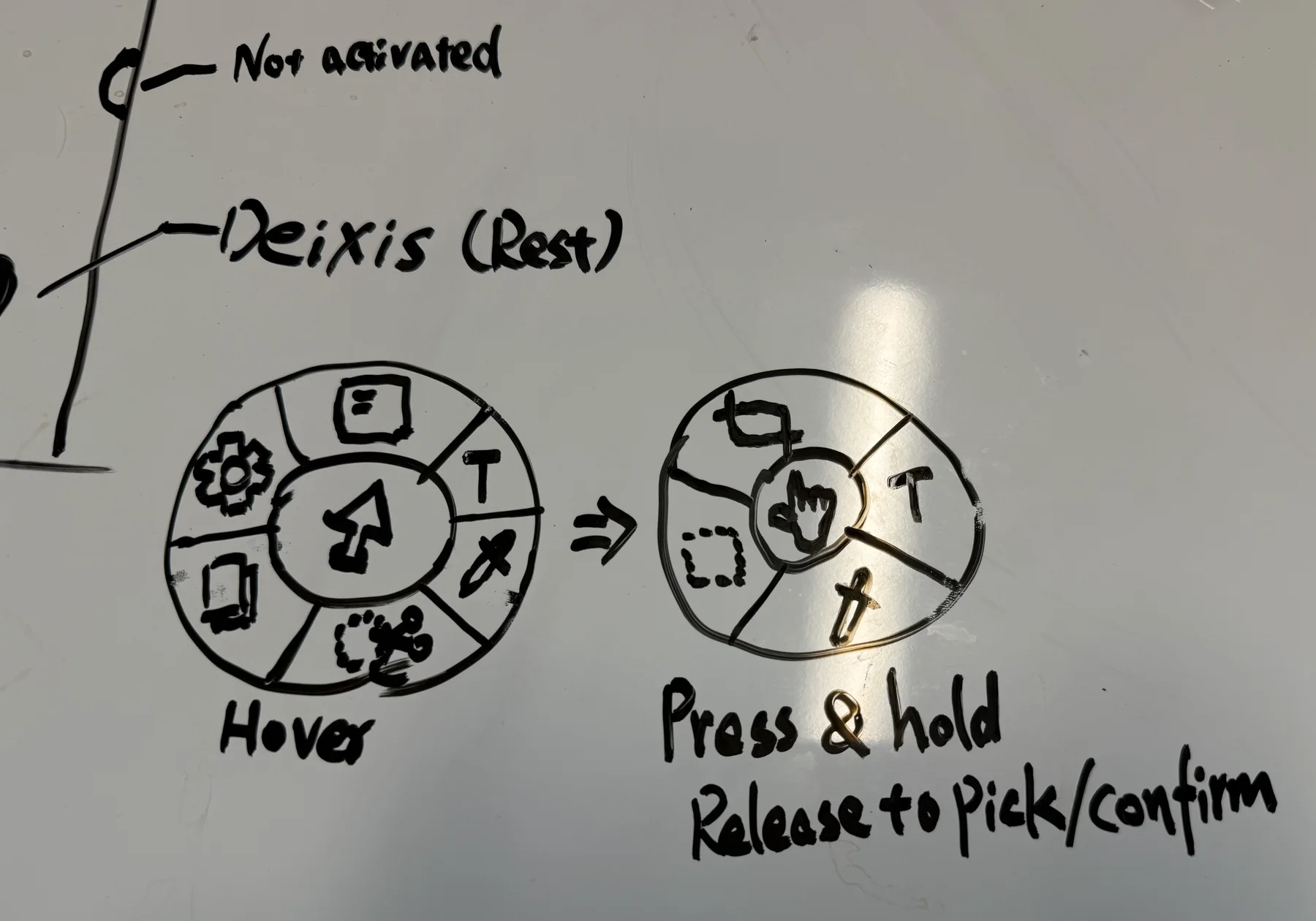
On the whiteboard, hovering the ball opened a ring of six. Only press and hold shipped, with four segments at the compass points. Hover collided with docking at the edge and opened by accident, and 90 degrees per target is hard to miss. Settings moved to the menu bar: it was not ring material.
Whiteboard: the ring on hover, and the press and hold that shipped
Build
Four versions inside the three-hour window
The research, the PRD, and the whiteboard came first. The timer started at 15:27 on September 13, and from there AI came in everywhere except the decisions: the overlay drawn in Claude Design, one spec per version written with Claude, and the Swift written by Claude Code.
Inside the window, Sep 13
v0.117:07
The pointing flow: a hotkey, a click, a payload
v0.2-region17:17
The ladder: a drawn frame, text, and neighbors
v0.317:45
Usable by someone else: mode inferred, Settings, the ball
v0.3-actions17:58
Snap, Text, Color, Cut, and the ring
v0.418:08
Before and after, found again by identifier
After it, Sep 14 to 16
v0.5Sep 14
The first minute: hints that appear once and fade
v0.6Sep 14
A download that works, and a daily update check
v0.7Sep 14
Deixis renamed Locant
v0.7.1Sep 15
The agent fetches it: an MCP server inside the app
v0.8Sep 16
Web pages carry their DOM handles, and Shift picks several elements
v0.4 was tagged at 18:08, with about nineteen minutes left on the timer.
What fought back
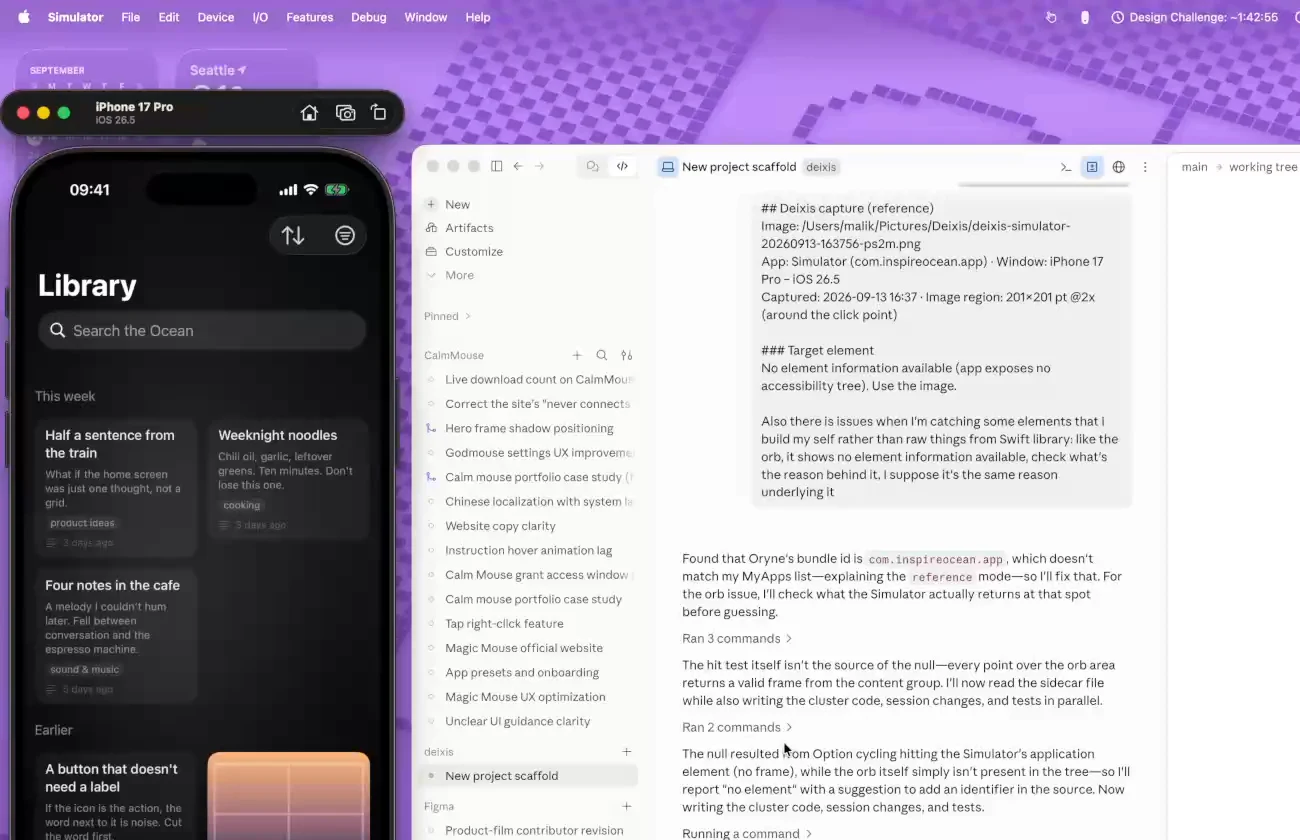
With an hour and 42 minutes left, a capture of Oryne's orbs came back empty: no element information available. The orbs are drawn in SpriteKit, and nothing had named them.
The empty capture: Oryne's orbs, with an hour and 42 minutes left
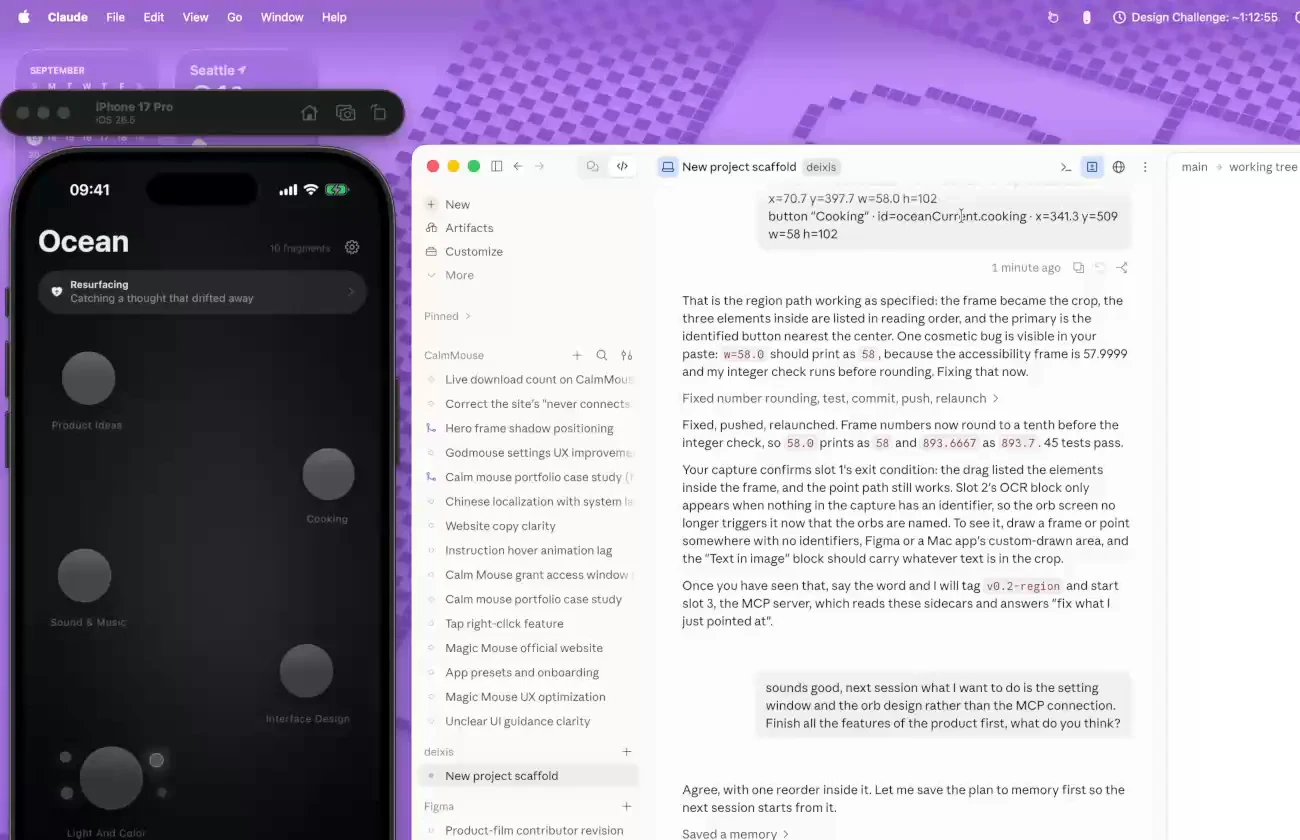
Two things came out of that capture. The ladder, so a view with no name still gives the agent something to work from. And a fix to Oryne itself: at 17:02 its orbs were exposed to accessibility with identifiers, which is why every capture on this page can name the Product Ideas orb. Pointing at my own app showed me what it had been hiding from the accessibility tree.
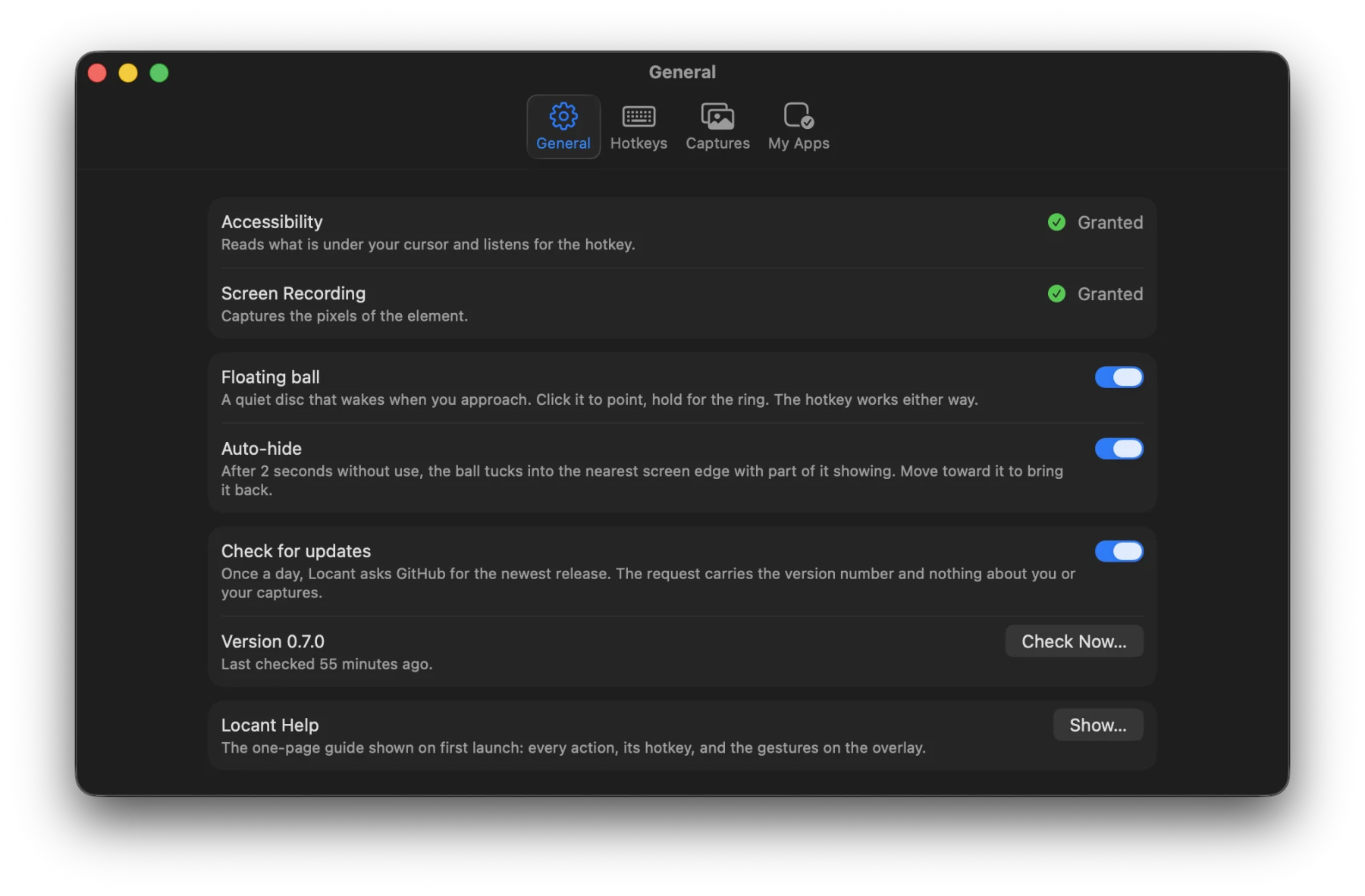
The other fight was Locant seeing itself. Every capture leaves Locant's own windows out, so the overlay, the ball, and the note never land in the picture. Point at Locant's Settings, and it reads the window behind.
Locant on Locant: its own Settings reads as image only, then the window behind it
The product before the plumbing
With an hour and 12 minutes left, the plan said the MCP server came next. I moved it behind the product: Settings and the ball first.
The call: Settings and the ball first, the MCP server after
It shipped in 0.7.1, on September 15, and not as the TypeScript package the PRD had planned. The server lives inside the app, started with a flag, because the captures live on the Mac, the app is already signed and updated, and nobody has to install Node.
I used Locant to build Locant. Everything after 0.4 was the product earning a second user: a first minute with no tour, a download that works, and an agent that fetches the capture itself.
Final Design
One element, from pointed at to verified
Every clip below is a recording of the released app.
Hover: Calculator, a CalmMouse slider with no identifier, the orb, then a web page
The payload is plain Markdown, so any agent takes it on paste. Locant is also its own MCP server: connect Claude Code, Cursor, or Codex in Settings, say "fix what I just pointed at", and the agent fetches the capture itself.
Any agent: the same payload in the Codex app, then in Antigravity
After the edit, run the app again. Locant finds the same element by its identifier, captures it when it looks different, and keeps every iteration with the git diff beneath.
Before & After: the orb found again after the edit, 1 file changed and 28 insertions
The four other actions ride the same ball. Hold it, release on one, and the result is on the clipboard.
The ring: hold the ball, release on Color, and pick a value from the screen
Settings had to pass for an Apple app's preferences: system controls only, and every default works on first launch.
Point, note, paste, and see what changed, without once describing which button.
Measured
What Locant saves is the question
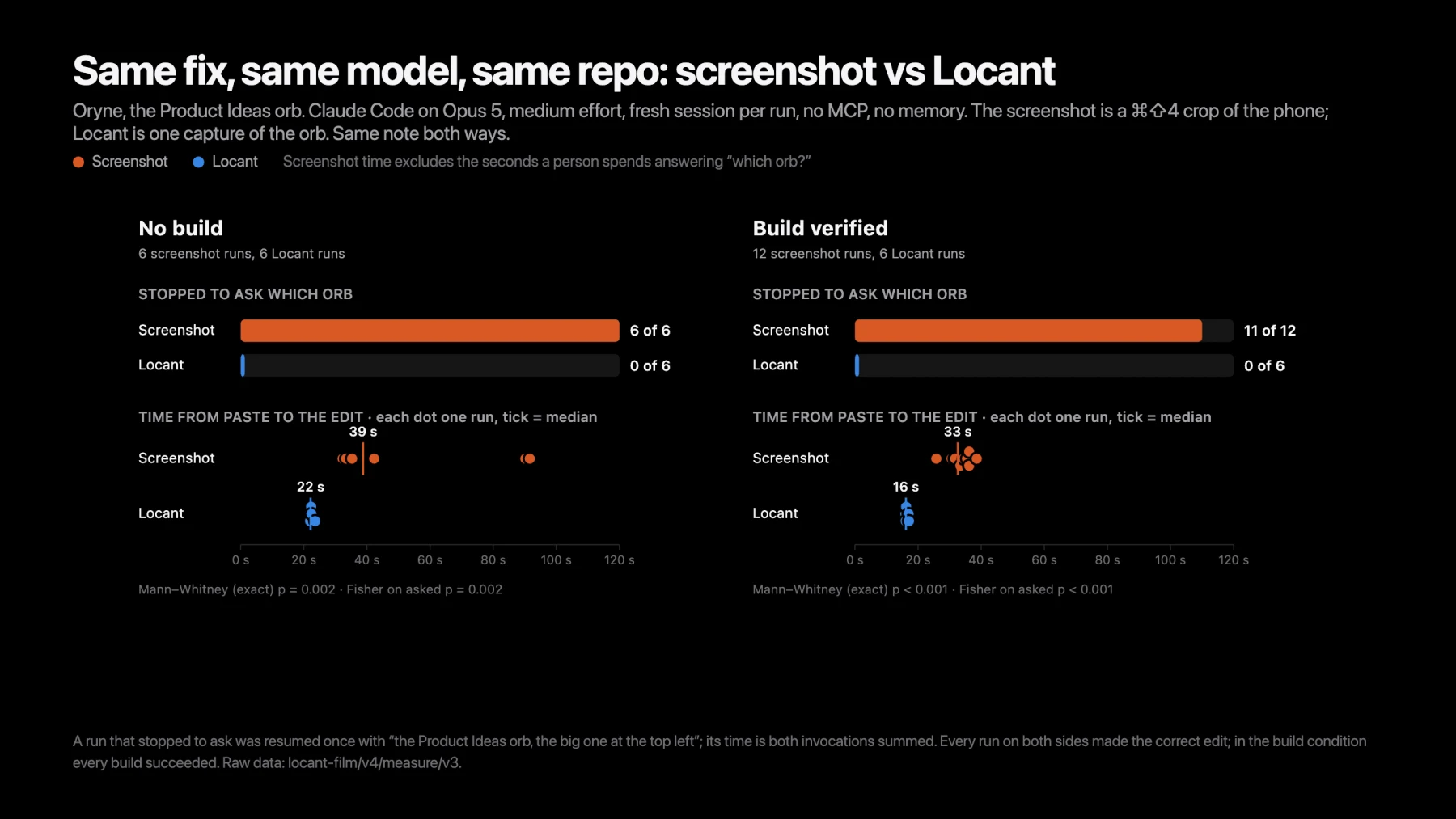
I measured one fix both ways. Same fix, same model, same repo, same note. The only difference was what got pasted: a ⌘⇧4 crop of the phone, or one Locant capture of the orb.
Asked which orb
0 of 12
With a screenshot, 17 of 18
Time to the edit
22 s
With a screenshot, 39 s. Medians, no build
Session tokens
253k
With a screenshot, 312k. Medians, no build
Correct edit
30 of 30
Every run on both sides, once the question was answered
One task, one app, one model: Claude Code on Opus 5 at medium effort, a fresh session per run, no MCP on either side, the repo reset between runs, and the order alternated. Method, transcripts, and statistics
Locant does not make the agent smarter. It removes the one thing the agent could not know from pixels.
Every capture is read twice: by me as I point, and by a model that sees only text. The label on the overlay is for the first reader. It says what the agent will get before I click. The image path leads the payload for the second, because a terminal agent can only open what the text tells it to.
Honest by default
The ladder names its rung instead of pretending. The agent table on the site says untested until someone has tested it. When the daily update check broke the promise of no network calls, every sentence that made the promise was rewritten to say what was true.
What is still open
Safari exposes the same web attributes as Chromium and has not been exercised yet. And because the payload's field names carry no Apple prefix, a port to another platform could write the same shape.